When was the last time you saw a "web-enabled" keyboard? I bet you it was on
some star trek like "future gadgets show". You know, the kind where they look at
cool new technology that in reality will never make it to store shelves. Well,
of all the things come to reality the web-enabled keyboard was a shocker..... I
mean just think... the web, enabled on a keyboard!!! Amazing. Just
by adding three buttons you have INSTANT access to.... you guessed it, the
web.
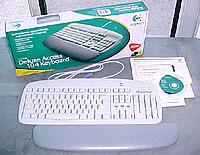 |
The Logitech Deluxe Access Keyboard comes with wrist support, driver
CD-ROM, instructions. |
Putting the sarcasm aside for just a brief moment, the Logitech Deluxe
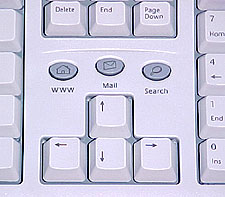
Access Keyboard comes with a set of three extra buttons which are in fact
quite useful. Located directly above the arrow keys are the "Web," "Email," and
"Search" buttons. These three buttons are not limited by their names, and each
can be customized depending on your personal preferences.
The keyboard comes with some software which allows the user to program each
of the keys to open up a specific website, program or one of either from a
customizable menu.
To operate what are essentially short cut keys, the user just presses the
button. Now depending on your settings you may see the name of the website, or
program pop up on your screen as the program loads. this feature can be toggled
on or off. For the person who is constantly opening up the same websites, or
programs on a day to day basis these short cut keys could potentially be a
blessing, not to mention time saving.
It would have been even better if Logitech had added a "www" key to the
keyboard. It seems that key is way-past due. Heck even a ".com" button would be
a useful addition to today's modern keyboard. Just think when was the last time
you used the tilda (~) key? I say replace the tilda key with (www)!
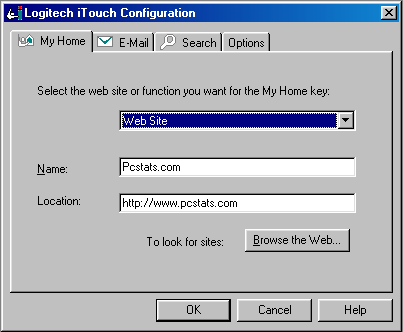
The software which is included with the keyboard enables you to
customize the link associated with each of the three keys (website or program).
Depending on your usage (more computer than internet, or more internet than
computer), the keys can each be set to open a different website or program,
along with the default settings.
The actual keyboard has a a full 104 keys and uses the soft
stroke, rather than than a harder, or crisp stroke. The keys travel about 4mm.
The keyboard measures 18" x 7" x 1.25".





 RSS Newsletter
