BACK TO PCSTATS + Motherboards
+ Videocards
+ Memory
+ Beginners Guides
News & Advanced Search  Feedback?
[X]   Directory of
Guides & Reviews
The PCstats Forums

Nov. ShoppingList
Beginners Guides
Weekly Newsletter
Archived Newsletters

  Press Releases
  Tech Glossary
  Folding Team
  3DMark Team
  Forum Team

+70 MORE Beginner GUIDES....
Poll: Windows 7 Upgrade?
Are you planning on upgrading to Windows 7 on Oct. 28th?
Yes, Windows 7 Here I come!
No, Windows XP still works
No, Windows Vista still works
Total Votes:  3960

 
The Rydium Network
Beginners Guides: Firewalls and Internet Security
Beginners Guides: Firewalls and Internet Security - PCSTATS
Overall Rating:    100%
Abstract: Securing your computer against threats from the Internet is an essential step. If you do not, you will, at some point, regret it. Guaranteed.

 mfg'r link     category     date published     author    
  PCSTATS   Beginners Guides   Jul.30.07   Mike D.  


Beginners Guides: Firewalls and Internet Security
Even at home your computer is vulnerable from internet intruders. Set up a Firewall and protect your PC with help from PCSTATS. - Version 1.3.0

Bookmark this PCSTATS guide for future reference.

When you use the Internet there are dangers around every corner. Viruses, malicious users, Trojan horses, Oh my! If these are just concepts to you, you are either lucky or well protected (or just un-connected). If these names trigger painful flashbacks to when your computer (and possibly your account balance) was rendered inoperable or compromised by one of the above, then join the club.

Either way, securing your computer against threats from the Internet is an essential step. If you do not, you will, at some point, regret it. Guaranteed.

This article is intended to provide some basic guidelines for securing your computer, and to give the reader a better understanding of how some of these technologies work. It is intended primarily for users of high-speed Internet connections, but most of the article is applicable to dial-up Internet users also.

As far as the home or small business user is concerned, Internet security can be broken down into three areas; Anti-virus software, Firewall protection and Recommended practices/Common sense.

To deal with the last of these three first, an essential step in securing your computer or network is understanding what actions can compromise you. What you don't know will hurt you, especially in regards to email. Some good basic security steps for dealing with email:

Don't use outlook express. I know, it's convenient, and you already know how to use it, but think about this. Outlook Express is the default email client for every windows version since 98. How many Millions of people do you think are using the default email client? Right. Now if you were writing a computer virus that you wanted to spread rapidly through the Internet by emailing itself, what e-mail client would you write it for? Exactly. If you want to see for yourself, go to www.sarc.com and type 'outlook express' in the search field. There are many alternative email clients available, some of them free. Try www.eudora.com for starters.
PCSTATS

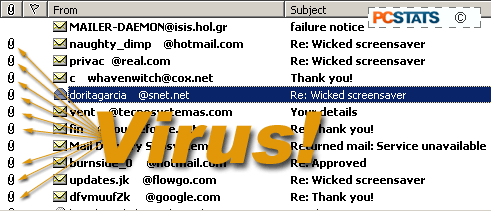
Don't open file attachments unless you are sure of the source. Email file attachments are one of the most common vectors for computer viruses. Modern antivirus software will scan incoming email as a matter of course, but you still have the possibility of a new virus that has yet to be added to the list of scanned-for viruses.


© 2009 PCSTATS.com
Please respect the time and effort that went into creating each PCSTATS Beginners Guide, do not illegally copy. Thank you.
Next Page >

Toss Some Change into The Tip Jar
For less than the cost of a latté you can let the hardworking staff who write and maintain the GUIDES at PCSTATS know that we've helped you out of a jam, or dished out a bit of great tech advice. Toss in $3 bucks, or whatever spare change you like.

 Page 1:  — Beginners Guides: Firewalls and Internet Security
 Page 2:  Some General Firewall Tips
 Page 3:  Dealing with Anti-virus Software
 Page 4:  Firewalls and Internet Security
 Page 5:  Circuit Level Gateways
 Page 6:  Stateful Inspection
 Page 7:  Configuring the Windows XP Firewall
 Page 8:  Configuring Firewall Services and Exceptions
 Page 9:  Creating Exceptions with the Service Pack 2 XP Firewall
 Page 10:  Client Filtering and Reverse Firewalls
 Page 11:  Common Port Numbers
SEARCH PCSTATS NEW - TRY IT OUT!
Use the power of Google to search all of PCSTATS and the PCSTATS Forums. Tell us what you think of this new feature - FEEDBACK?

   20.11.09 | 9:58P
Hardware Sections 
· Beginners Guides
· Cases and Access.
· CD-ROMs
· Chipsets
· Computers / SFF PCs
· Cooling - Heatsinks
· CPU / Processors
· Digital Cameras
· Hard Drives
· Home Theatre
· Memory
· MP3 Players
· Monitors
· Motherboards
· Mouse Pads
· Networking
· Notebooks
· PCs and SFF PCs
· Peripherals
· Powersupply
· Printers
· Servers
· Software / OS
· Videocards
- - -
· Editorials
Industry PR 
» GIGABYTE Unleashes First UD7 Motherboard

» Seagate Ships 2TB ATA 6GB/s Hard Drive

» Corsair Obsidian Series 800D high-performance chassis


google
 
PCstats Network Features Information About Us Rydium Network
FrostyTech
TransmetaZone
BeginnersPC
RamFinder
ShoppingList Assistance
PCstats.com Newsletter
Tech Glossary
Technology WebSite Listings
About Us
Employment / Internships
Privacy Policy
PermaLink News
Archived News
Submit News (Review RSS Feed)
Site Map
PCstats Wallpaper
Rydium Network
Advertising

How's Our Driving?
© Copyright 1999-2009 www.pcstats.com All rights reserved. Privacy policy and Terms of Use.