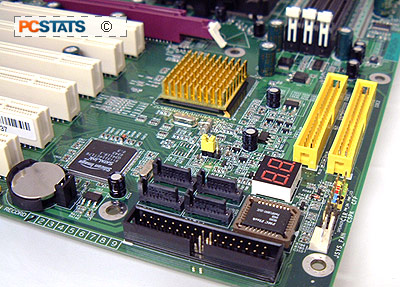
 nVIDIA's new
NF3-250 Athlon64 chipset addresses all the issues people had with the original
NF3-150. For starters, the NF3-250 is a single
chip solution like the NF3-150, but it now natively supports four Serial ATA
drives as well as SATA RAID!
nVIDIA's new
NF3-250 Athlon64 chipset addresses all the issues people had with the original
NF3-150. For starters, the NF3-250 is a single
chip solution like the NF3-150, but it now natively supports four Serial ATA
drives as well as SATA RAID!
By default "NVIDIA RAID" supports the usual RAID
modes 0, 1, 0+1 and JBOD. One very cool feature is you can mix and match IDE and
Serial ATA drives in a RAID array up to a maximum of four Serial ATA devices,
and two IDE.
While I doubt the vast majority of end users will
take advantage of Gigabit ethernet any time soon, many were not pleased that the
NF3-150 only included a 10/100 MAC. nVIDIA has gone all the ay this time, their
onboard Gigabit NIC does not run on the PCI bus, like most traditional Gigabit
NIC's, rather it runs on its own private bus very much like Intel's CSA Gigabit
Ethernet! The 10/1000 NIC still requires a PHY, the Cicada SimplyPHY in the case
of the Epox 8KDA3+. Something new has been added, and that is the nVidia
Firewall - a hardware based solution built into the NF3-250GB
chipset.
nVIDIA have also increased the number of USB 2.0
ports from six (on the NF3-150) to eight for the NF3-250 chipset. Apparently
nVIDIA has optimized the NF3-250 for use with their own videocards as well, of
course that does not mean non-nVIDIA based videocards won't run.
For testing
we're going to put an Asus Radeon 9800XT head-to-head against a Gigabyte
GeForceFX 5950 Ultra to see which is really faster and by how much.
:-)
nVIDIA Firewall!
One feature that we really like about nVIDIA's
nForce3-250Gb is the onboard hardware firewall. With more people jumping on
broadband, it's important to safeguard your PC against possible worm/hacker
attacks. nVIDIA has taken it upon themselves to include a hardware firewall with
their nForce2-Ultra400Gb, and nForce3-250Gb chipsets which should protect their
users from possible attacks.

To access the Firewall functions you
simply double click on the "nVIDIA Web-based Interface" icon on your desktop, or
in the programs menu and that will bring up the above window. nVIDIA has
organized their Network Access Manager into three different categories;
Ethernet, Firewall and Administration. Clicking on any of the headings or links
in the main window changes the menu to the left.

For instance, selecting the Firewall
setup gives you the following options shown above. You can use nVIDIA's defined
levels which is recommended, or configure things yourself. The hardware firewall
allows you to configure what ports are opened, closed or in stealth mode. Once
changes are made, the network interface needs to be restarted. Simply give your
PC a few minutes and you'll be all set. If you suspect any suspicious activity
you can always look things up in the firewall logs.
Please note though, the onboard hardware
firewall is not enabled by default, and you will need to access
the Network Access Manager before this feature is turned on. Once the nVIDIA
hardware firewall is turned on it should protect your computer against the most
common attacks.





 RSS Newsletter
