BACK TO PCSTATS + Motherboards
+ Videocards
+ Memory
+ Beginners Guides
News & Advanced Search  Feedback?
[X]   Directory of
Guides & Reviews
The PCstats Forums

Nov. ShoppingList
Beginners Guides
Weekly Newsletter
Archived Newsletters

  Press Releases
  Tech Glossary
  Folding Team
  3DMark Team
  Forum Team

+70 MORE Beginner GUIDES....
Poll: Windows 7 Upgrade?
Are you planning on upgrading to Windows 7 on Oct. 28th?
Yes, Windows 7 Here I come!
No, Windows XP still works
No, Windows Vista still works
Total Votes:  3958

The Rydium Network
Hitachi CML181SXW 18.1 inch TFT LCD Display
Hitachi CML181SXW 18.1 inch TFT LCD Display - PCSTATS
Overall Rating:    79%
Abstract: At just over $900USD, for a 18.1" TFT LCD the CML181SXW has to be one of the most aggressive priced LCD's on the market today.

 mfg'r link     category     date published     author    
  Hitachi   Monitors   Apr.12.02   M. Page  


Hitachi CML181SXW 18.1 inch TFT LCD Display


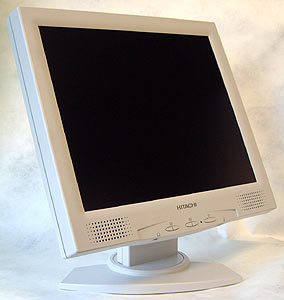
Hitachi are firmly entrenched with the corporate markets who need cost effective displays with the best amount of features to keep the workers happy. At just over $900USD, for a 18.1" TFT LCD the CML181SXW has to be one of the most aggressive priced LCD's on the market today. Add to that support for both DVI and analog video signals, integrated small form factor speakers, and what is probably the most attractive feature for the board office worker - a headphone jack and volume wheel - and you have a large LCD display which should generate a good amount of interest.

The bulky design of the bezel signals that this 18.1" LCD is looking at cost effectiveness first and industrial design second, but there are a few interesting tricks round back that save face. Two removable panels pop off in the rear to completely hide the four sets of cables leading from the LCD panel. The wires are hidden all the way down to the very bottom thanks to a cable way.

The CML181SXW series uses a 18.1" active matrix TFT LCD with a 1280x1024 resolution screen. That is comparable to a 19" CRT display. The LCD monitor is capable of displaying 16.7 Million colors and features a 0.280mm dot pitch, contrast ratio of 350:1, brightness of 235 cd/m2, pixel response time of somewhere around 30-35ms and an exceptionally wide viewing angle of (85/85/85/85). Until this point, the widest viewing angles we has seen were 80/80/80/80. The move to 170 degrees vertical and 170 degrees horizontal just means the consumer benefits more than ever.

Hitachi CML181SXW Display:


Screen Size: 18.1" Diagonal
Resolution: 1280x1024 pixel
Pixel Pitch: 0.280"
Luminosity: 235cd/m2
Contrast Ratio: 350:1
Viewable Angle: 85/85/85/85
Pixel Response: 30-35ms
Power Draw: 54W
Approx. Retail Price: $900 USD
Manufacturer: Hitachi Displays
Inputs: 15-pin Analog VGA

18.1" LCD Display Comparisons
Display pixel pitch luminance contrast viewing angle screen size max resolution price range
Hitachi CML181SXW 0.280 mm 235 cd/m2 350:1 85/85/85/85 18.1" 1280 x 1024 $900
Samsung 181T 0.281 mm 250 cd/m2 450:1 85/85/85/85 18.1" 1280 x 1024 $1100
Samsung 181B 0.281 mm 250 cd/m2 400:1 80/80/80/80 18.1" 1280 x 1024 $1200 (est.)
Samsung 180T 0.280 mm 220 cd/m2 350:1 80/80/80/80 18.1" 1280 x 1024$1600
Samsung 800TFT 0.2805 mm 170 cd/m2 220:1 80/80/80/80 18.1" 1280 x 1024$2500
up/down/left/right (USD)

Unlike keyboards, mice and other user interfaces there really hasn't been any standardization of the main controls on the front of monitors or LCD displays. Most of the time this is great as it frees the designers to try many different ideas to find the most user friendly and intuitive set of controls.

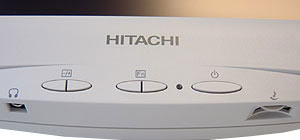
Sometimes things don't quite develop all the way, and in the case of the Hitachi CML181SXW the control panel is a bit of both. The necessary adjustments like brightness and contrast are all easily accessible, but navigating through the on screen menus are a little bit introverted as all the buttons are largely unmarked for that arena.

Luckily most users will not need to adjust much especially if they connect the CML181SXW via the DVI cable. Individuals with analog video cards will want to set the display to "auto adjust", and to do this they will have to go into the OSD and select the correct icon.

© 2009 PCSTATS.com Next Page >


 Page 1:  — Hitachi CML181SXW 18.1 inch TFT LCD Display
 Page 2:  The CML181SXW Monitor Up Close
 Page 3:  TFT Display Evaluation Notes
 Page 4:  LCD Display Issues, Comparisons and Conclusions
SEARCH PCSTATS NEW - TRY IT OUT!
Use the power of Google to search all of PCSTATS and the PCSTATS Forums. Tell us what you think of this new feature - FEEDBACK?

   20.11.09 | 6:23P
Hardware Sections 
· Beginners Guides
· Cases and Access.
· CD-ROMs
· Chipsets
· Computers / SFF PCs
· Cooling - Heatsinks
· CPU / Processors
· Digital Cameras
· Hard Drives
· Home Theatre
· Memory
· MP3 Players
· Monitors
· Motherboards
· Mouse Pads
· Networking
· Notebooks
· PCs and SFF PCs
· Peripherals
· Powersupply
· Printers
· Servers
· Software / OS
· Videocards
- - -
· Editorials
Industry PR 
» GIGABYTE Unleashes First UD7 Motherboard

» Seagate Ships 2TB ATA 6GB/s Hard Drive

» Corsair Obsidian Series 800D high-performance chassis


google
 
PCstats Network Features Information About Us Rydium Network
FrostyTech
TransmetaZone
BeginnersPC
RamFinder
ShoppingList Assistance
PCstats.com Newsletter
Tech Glossary
Technology WebSite Listings
About Us
Employment / Internships
Privacy Policy
PermaLink News
Archived News
Submit News (Review RSS Feed)
Site Map
PCstats Wallpaper
Rydium Network
Advertising

How's Our Driving?
© Copyright 1999-2009 www.pcstats.com All rights reserved. Privacy policy and Terms of Use.