BACK TO PCSTATS + Motherboards
+ Videocards
+ Memory
+ Beginners Guides
News & Advanced Search  Feedback?
[X]   Directory of
Guides & Reviews
The PCstats Forums

Nov. ShoppingList
Beginners Guides
Weekly Newsletter
Archived Newsletters

  Press Releases
  Tech Glossary
  Folding Team
  3DMark Team
  Forum Team

+70 MORE Beginner GUIDES....
Poll: Windows 7 Upgrade?
Are you planning on upgrading to Windows 7 on Oct. 28th?
Yes, Windows 7 Here I come!
No, Windows XP still works
No, Windows Vista still works
Total Votes:  3960

The Rydium Network
Samsung Syncmaster 957MB Monitor Review
Samsung Syncmaster 957MB Monitor Review - PCSTATS
Overall Rating:    87%
Abstract: Flat face CRT's have a few advantages over their older counterparts which are not simply cosmetic.

 mfg'r link     category     date published     author    
  Samsung   Monitors   Jun.24.03   M. Page  


Samsung Syncmaster 957MB Monitor Review


The rise in popularity of the flat screen CRT monitor has fully come to fruition. No longer are flat face CRT's significantly more expensive than their curved-tube counterparts, making them quite affordable, and quite worth getting.

Flat face CRT's have a few advantages over their older counterparts which are not simply cosmetic. For starters, they offer better readability and resolution at the outer corners of the screen. The flat glass surface also tends to reflect less ambient light from the surrounding environment which makes the display more pleasant to look at in a well illuminated room.

Each manufacturer has their own terms, techniques, and technologies for constructing CRT displays which have a 'flat' slab of glass up front. LG for example have advanced the technology to a point where both the inner and outer surfaces of the display screen are perfectly parallel, yielding arguably one of the best displays of all.

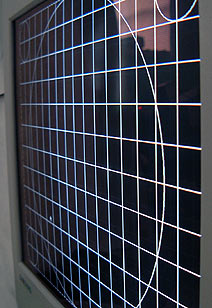
Samsung use a couple different methods in their flat face CRT's to achieve the same result. Typically, the inner surface of a Samsung flat face display is slightly curved in just one axis. The Syncmaster 957MB uses such a process so there is only a very subtle curve along the horizontal axis of the inner screen surface. The curve is so small that it's really only noticeable with the aid of a small point light source test.

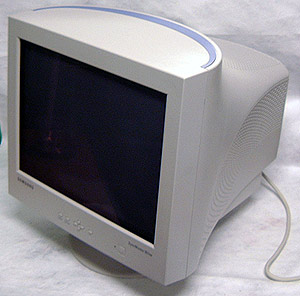
The 19" Samsung Syncmaster 957MB is based upon an Invar Shadow mask screen mesh, features a 0.20mm horizontal dot pitch and an optimal resolution of 1600x1200 @ 75Hz. The screen will support as high as 1920x1440 if you are lucky enough to use a videocard that powerful, but I preferred 1280x1024 @ 90Hz for the purposes of these tests.

Samsung 957MB Display:

Viewable Screen Size: 19" Diagonal
Max Resolution: 1920x1440 @ 64Hz
Pixel Pitch: 0.20mm (H)
Shadow Mask: Invar Shadow Mask
Power Draw: 100W
Features: Magic Bright and Highlight Zone
Approx. Retail Price: $370CDN.
Manufacturer: www.samsung.ca
Inputs: Analog VGA cable

The low curve, and improved ability to resolve text and images at the outer edges of the display make this monitor quite a pleasure to use. With a dot-pitch of 0.20mm (H), the pixels are fine and offer a very nice picture in return, which makes the 957MB display ideal for drafting and CAD work as much as gaming.

The typical power draw is 100W, and in power save (standby) mode that number drops down to just 3W. The 957MB weighs in at 23.5kg, and measures 44x46x46cm in size. Samsung support the Syncmaster 957MB with a three year warranty, and it retails for about $370CDN..

MagicBright and Highlight Zone.

The Samsung 957MB features two things you don't normally find on a monitor - a technology known as "MagicBright" and "Highlight Zone."

Though the names of these two features are different, they each involve the same technique of basically cranking up the brightness. When engaged, MagicBright will increase the overall luminance of the display by several orders.

The idea is to adjust the brightness of the monitor to suite specific tasks like reading text, playing a video game or watching a DVD on the computer. Under the text setting the brightness of the screen goes down a little to make reading less stressful on the eyes. The other two settings make the screen drastically brighter, and would be great for watching a movie from a distance where dull screens can make it difficult to see dark scenes.

The HighlightZone tool is a feature I'm less clear about its intended use... What it does is basically create a small area within the screen which is very bright. The size and position of the brightened area can be moved about, and its shape changed. Intensity, contrast, and even the sharpness of the items within the HighlightZone can be adjusted. As to what importance this plays in day to day computing is not really clear.

© 2009 PCSTATS.com Next Page >


 Page 1:  — Samsung Syncmaster 957MB Monitor Review
 Page 2:  What makes the 957MB stand out?
 Page 3:  CRT Display Evaluation Notes
 Page 4:  Final Evaluation Notes & Conclusions
SEARCH PCSTATS NEW - TRY IT OUT!
Use the power of Google to search all of PCSTATS and the PCSTATS Forums. Tell us what you think of this new feature - FEEDBACK?

   20.11.09 | 11:18P
Hardware Sections 
· Beginners Guides
· Cases and Access.
· CD-ROMs
· Chipsets
· Computers / SFF PCs
· Cooling - Heatsinks
· CPU / Processors
· Digital Cameras
· Hard Drives
· Home Theatre
· Memory
· MP3 Players
· Monitors
· Motherboards
· Mouse Pads
· Networking
· Notebooks
· PCs and SFF PCs
· Peripherals
· Powersupply
· Printers
· Servers
· Software / OS
· Videocards
- - -
· Editorials
Industry PR 
» GIGABYTE Unleashes First UD7 Motherboard

» Seagate Ships 2TB ATA 6GB/s Hard Drive

» Corsair Obsidian Series 800D high-performance chassis


google
 
PCstats Network Features Information About Us Rydium Network
FrostyTech
TransmetaZone
BeginnersPC
RamFinder
ShoppingList Assistance
PCstats.com Newsletter
Tech Glossary
Technology WebSite Listings
About Us
Employment / Internships
Privacy Policy
PermaLink News
Archived News
Submit News (Review RSS Feed)
Site Map
PCstats Wallpaper
Rydium Network
Advertising

How's Our Driving?
© Copyright 1999-2009 www.pcstats.com All rights reserved. Privacy policy and Terms of Use.