BACK TO PCSTATS + Motherboards
+ Videocards
+ Memory
+ Beginners Guides
News & Advanced Search  Feedback?
[X]   Directory of
Guides & Reviews
The PCstats Forums

Nov. ShoppingList
Beginners Guides
Weekly Newsletter
Archived Newsletters

  Press Releases
  Tech Glossary
  Folding Team
  3DMark Team
  Forum Team

+70 MORE Beginner GUIDES....
Poll: Windows 7 Upgrade?
Are you planning on upgrading to Windows 7 on Oct. 28th?
Yes, Windows 7 Here I come!
No, Windows XP still works
No, Windows Vista still works
Total Votes:  3960

 
The Rydium Network
Beginners Guides: Little Known Features of WindowsXP
Beginners Guides: Little Known Features of WindowsXP - PCSTATS
Abstract: We will explore the features and abilities of WinXP, with an eye towards providing a better understanding of the capabilities of the operating system, and the options available to the user.

 mfg'r link     category     date published     author    
  PCSTATS   Beginners Guides   Jul.30.07   Mike D.  


Beginners Guides: Little Known Features of WindowsXP
Call it... Zen and the art of WindowsXP Maintenance. - Version 1.4.0

There can be little doubt that Windows XP is Microsoft's best OS yet. While it has a few disadvantages in terms of unnecessary bloat, its balance of performance, stability and outward user-friendliness is hard to match.

As WindowsXP is based on Microsoft's line of server operating systems, it is undoubtedly that which provides it with a rather pleasing lack of crashes. Compare WindowsXP to Windows 98, where the daily reboot has pretty much been accepted as a feature of the operating system, and you can see why it has been embraced so well. This same sever-OS-origin also provides XP with a deep layer of configurability. Not necessarily tweaks as such, but tricks to getting a grip on what is happening behind the scenes for those with an interest. Call it... Zen and the art of Windows XP Maintenance if you will.

In this PCSTATS Guide, we will explore some of the little-known features and abilities of Windows XP Home and Professional Editions, with an eye towards providing a better understanding of the capabilities of the operating system, and the options available to the user.

Computer Management

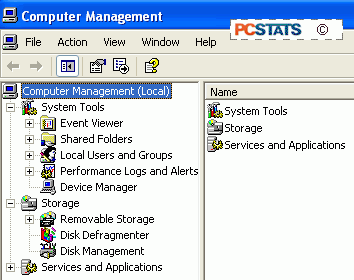
Depending on the approach you took learning to use Windows XP, the computer management screen is either one of the first things you learned about, or something you have never heard of. Derived directly from one of the most useful features of Windows 2000, it offers an excellent way of managing many of the most important elements of the operating system from a single interface.
PCSTATS

You can open the computer management interface by right clicking on 'my computer' and selecting 'manage.' The computer management window is divided into three sections. First is System Tools, which is comprised of several tools to help you manage and troubleshoot your computer.

© 2009 PCSTATS.com
Please respect the time and effort that went into creating each PCSTATS Beginners Guide, do not illegally copy. Thank you.
Next Page >

Toss Some Change into The Tip Jar
For less than the cost of a latté you can let the hardworking staff who write and maintain the GUIDES at PCSTATS know that we've helped you out of a jam, or dished out a bit of great tech advice. Toss in $3 bucks, or whatever spare change you like.

 Page 1:  — Beginners Guides: Little Known Features of WindowsXP
 Page 2:  The Windows XP Event Viewer
 Page 3:  Local Users and Groups
 Page 4:  Hard Disk Management
 Page 5:  Mounting Drives as Folders
 Page 6:  To Mount a Partition as a Directory
 Page 7:  Operating System Restore
 Page 8:  System Restore Continued
 Page 9:  Windows Services
 Page 10:  How to Disable a Service
 Page 11:  Accessibility Options
 Page 12:  Built in Backup Utility
 Page 13:  Files and Setting Transfer Wizard / Local Computer Policy Settings
 Page 14:  Windows Task Manager / Enabling Firewall
SEARCH PCSTATS NEW - TRY IT OUT!
Use the power of Google to search all of PCSTATS and the PCSTATS Forums. Tell us what you think of this new feature - FEEDBACK?

   21.11.09 | 12:03A
Hardware Sections 
· Beginners Guides
· Cases and Access.
· CD-ROMs
· Chipsets
· Computers / SFF PCs
· Cooling - Heatsinks
· CPU / Processors
· Digital Cameras
· Hard Drives
· Home Theatre
· Memory
· MP3 Players
· Monitors
· Motherboards
· Mouse Pads
· Networking
· Notebooks
· PCs and SFF PCs
· Peripherals
· Powersupply
· Printers
· Servers
· Software / OS
· Videocards
- - -
· Editorials
Industry PR 
» GIGABYTE Unleashes First UD7 Motherboard

» Seagate Ships 2TB ATA 6GB/s Hard Drive

» Corsair Obsidian Series 800D high-performance chassis


google
 
PCstats Network Features Information About Us Rydium Network
FrostyTech
TransmetaZone
BeginnersPC
RamFinder
ShoppingList Assistance
PCstats.com Newsletter
Tech Glossary
Technology WebSite Listings
About Us
Employment / Internships
Privacy Policy
PermaLink News
Archived News
Submit News (Review RSS Feed)
Site Map
PCstats Wallpaper
Rydium Network
Advertising

How's Our Driving?
© Copyright 1999-2009 www.pcstats.com All rights reserved. Privacy policy and Terms of Use.