Samsung Syncmaster 173P 17-inch LCD Display Review
As I look at
the Samsung 173P 17" LCD screen sitting next to my trusty old ADI Microscan CRT monitor, it
is now most certainly "the age of the LCD." Samsung have mastered the
art of the high contrast screen, and the Samsung 173P we are testing today
certainly makes the CRT screen next to it appear old and gray by comparison.
Looking at the Samsung 173P, whites are bright and
vibrant, and blacks almost seem to absorb every photon of light that
passes by... all of which adds up to gorgeous screen characteristics that will make working on the 173P a pleasure. But what about gaming, or watching a few DVDs?
The compact
little 17" screen of the Samsung
Syncmaster 173P boasts a resolution of
1280x1024 pixels, and an industry standard dot pitch of 0.264mm that makes
for a crisper image than current 19" LCDs can muster. While the 173P does
retail a bit higher than the average 17" LCD, priced a little over
$600USD, it does offer up a contrast ratio of 700:1 and brightness value of 270
cd/m2.
Its pixel refresh time is pretty standard
at 25ms, but its viewing angles break the barrier at 178 degrees (horizontal/vertical).
I'm not sure what person would expect to work on a screen from
an angle of 2 degrees, but at least you have the option open to you.
;-)
 |
|
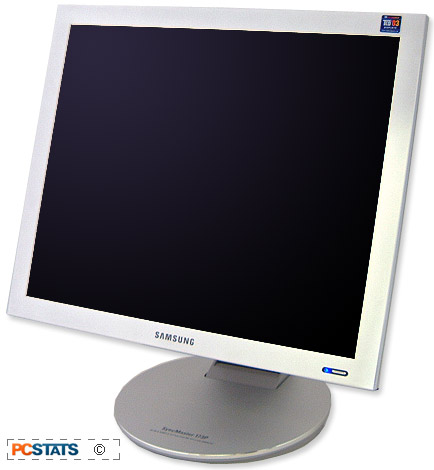
Samsung 173P LCD Display |
|
|
 |
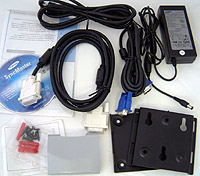
| Includes: |
|
Manual, digital video cable, analog video cable, power cable and
AC adaptor, software, VESA mounting
bracket. |
 |
|
SPECIFICATIONS:
Screen
size: 17"
Brightness:
270 cd/m2
Contrast
Ratio: 700:1
Viewing
Angle: 178°/178°
Inerface:
Analog/DVI
Resolution:
1280x1024
Pixel Pitch:
0.264mm
Response Time:
25ms
Power Draw:
40W
Dimensions:
15x15.6x1.8"
| | |
As we go over the Samsung
173P, I'd first like to draw your attention to the 20mm-wide aluminum bezel on
the front of the display (the bezel is the thin strip surrounding the
screen on all four sides). Do you notice a peculiar lack of
buttons?
In keeping with the industrial
design element of the Samsung "P-series," the Syncmaster 173P only has one
button - a power button flanked by a subtle blue LED status
indicator.
 |
| The power button is touch sensitive. Touch and hold it for a few seconds to set the 173P to cycle between the Analog and Digital video connections. |
As LCD
displays have quickly been transformed into functional works of art, a trend
initiated by Apple's iMac, Tier1 manufacturers like Samsung have been striving
to differentiate their products on the aesthetics front more and more. The 173P
display is brother to the Porsche designed 171P, but it is not a blood relative.
In keeping with high style
etiquette, the rear of the 173P is glossy white plastic (again, a tribute to
just how pervasive iMac design is), and the front is button-less, its control features
replaced entirely by a software program called MagicTune 2.0 (WinXP, 2K,
ME) which we'll look into next.






 RSS Newsletter
