Beginners Guides: Making DVD Movies from Video Files
Making a DVD out of your
own video files (or home movies) isn't too hard. In
fact, we'll walk you through the task step by step. - Version
1.0.0
Video cameras have been
getting more high-tech, more capable and more available to the average consumer.
The result of this is that there are a lot of camcorders out there. Despite the
advent of new technology like straight-to-DVD recording and purely digital
storage, the majority of camcorder films still end up on VHS tape for viewing.
Given the imminent death of the VCR (as soon as recordable DVD set-top boxes
become an affordable item), we feel it's a good time to get a jump on converting
your treasured home movies to recordable DVDs.
In a recent PCstats.com
Beginner's
Guide , we explored the process of turning
your videotaped home movies into compressed video files for storage and display
on your computer. We'd now like to present the companion piece to that article.
In this guide, we will explore and explain the process of authoring DVDs from
video files you have stored on your computer, that will play on any home DVD
player. We will also run through some basic editing techniques to help you get
the best out of your home movies.
How DVD-video disks work
DVD-video disks are the type
of DVD you are likely most familiar with. Anytime you rent and watch a DVD, it's
going to be some variety of DVD-video disk.
The video that is written to a
DVD-video disk is encrypted in MPEG-2 format. This serves to reduce the size of
the raw video to the point where it will fit onto a DVD while still preserving
most of the image quality of the master copy. Your home DVD player is equipped
with the necessary hardware to uncompress these MPEG-2 video files in real time
in order to display the image on your TV. Compressed audio files are also
written to the DVD and uncompressed and played in sync with the video to
reproduce the movie.
If you've ever explored the
contents of a DVD movie on your PC's DVD drive, you will have seen something
like this; two folders, VIDEO_TS and AUDIO_TS.

The VIDEO_TS folder contains
all the compressed video and sound files, as well as the information that allows
the player to access them in proper order. The AUDIO_TS folder is used for
DVD-audio disks and is left empty for DVD-video, though it is always included
for compatibility reasons.
The contents of a typical
VIDEO_TS folder will resemble this:
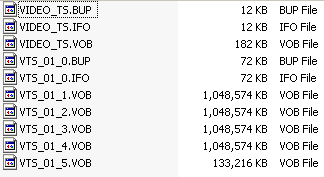
The .VOB files contain the
actual video and audio data, not to mention subtitles, extra viewing angles,
pretty much everything you see and hear. They are up to a gigabyte in size and
are numbered sequentially.
The .IFO files contain
information about the .VOB files. Your DVD player will use these to locate and
sequence the video and audio, figure out where each chapter begins and ends,
etc. The .BUP files are backups of the .IFO files.
The VIDEO_TS.IFO and .VOB
files are the first items that the DVD player will access, and generally contain
the menu, at least in the case of home-authored DVDs.






 RSS Newsletter
