BACK TO PCSTATS + Motherboards
+ Videocards
+ Memory
+ Beginners Guides
News & Advanced Search  Feedback?
[X]   Directory of
Guides & Reviews
The PCstats Forums

Beginners Guides
Weekly Newsletter
Archived Newsletters

+70 MORE Beginner GUIDES....
Poll: Windows 7
Have you Upgraded to Windows 7?
yes, love it!
nope, staying put
yes, but not happy
Total Votes:  807

 
 [NEW!] 
Gigabyte GA-P55A-UD4P Intel P55 Express Motherboard Review
Beginners Guides: Crash Recovery & The Blue Screen of Death
Beginners Guides: Crash Recovery & The Blue Screen of Death - PCSTATS
Marketplace: $/£/€ Price Search
Abstract: PCstats lays out the ground rules to fixing the problems that can cause a Blue Screen of Death. Or, you can just reinstall your ENTIRE PC... it's your choice!
 Manufacturer:  Category:  Published:  Author: 
  PCstats.com   Beginners Guides   Apr.12.2006   Mike D.  


Beginners Guides: Crash Recovery - Dealing with the Blue Screen Of Death
A BSOD will strike every Windows PC at least once. PCstats lays out the ground rules to fixing the problems that can cause a Blue Screen of Death. Or, you can just reinstall your ENTIRE PC... it's your choice! - Version 1.2.0

If you've ever used Windows, chances are you've experienced the lovely shade of blue associated with the famous Windows Stop Error or 'Blue Screen of Death.' This frequent, although less so in newer operating systems, error occurs whenever Windows senses a software, hardware or driver error which will not allow it to continue operating properly. In other words, it happens all the time, for all sorts of reasons.

Often, if you're lucky, the problem will resolve itself with a simple reboot and you may never have to worry about it again. More typically though, the BSOD is a harbinger of trouble and you may find yourself faced with another and another until you throw up your hands... but all is not lost.

In this article PCstats.com will walk you through the BSOD in many of its most familiar incarnations. We will not be exploring and cataloguing what each BSOD means, but rather providing a set of tools for troubleshooting that you can use to get around any Blue Screen Of Death, or constant crash issue. Just another step in PCstats' never-ending quest to save your hard earned cash from going to the computer repair shop.

What is a Blue Screen of Death?

The Blue Screen of Death, or more properly the 'Windows stop message' occurs when Windows detects a problem or error from which it cannot recover. The operating system halts and diagnostic information is displayed on a blue screen. In newer versions of the operating system, the contents of the PC's memory are dumped to a file for later analysis.

All Windows XP stop errors are numbered according to the circumstances that caused the error, which assists enormously in troubleshooting them.
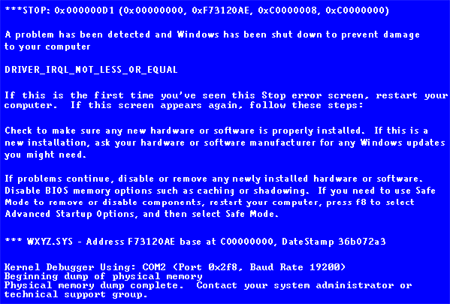
Let's take a moment to look at a BSOD in its natural environment, careful now, we don't want to startle it... Note the eye catching shade of blue intended to warn us of trouble, the detailed list of hexadecimal numbers, and relatively unhelpful 'tip.' This is the BSOD in all its glory, so be very afraid if you ever come face to face with this hideous creature!

© 2010 PCSTATS.com
Please respect the time and effort that went into creating each PCSTATS Beginners Guide, do not illegally copy. Thank you.
Next Page >

Toss Some Change into The Tip Jar
For less than the cost of a latté you can let the hardworking staff who write and maintain the GUIDES at PCSTATS know that we've helped you out of a jam, or dished out a bit of great tech advice. Toss in $3 bucks, or whatever spare change you like.
 Pg 1.  — Beginners Guides: Crash Recovery & The Blue Screen of Death
 Pg 2.  Reading the Blue Screen Of Death
 Pg 3.  Why Do BSOD's happen?
 Pg 4.  Basic troubleshooting for all BSOD errors
 Pg 5.  Section A: Troubleshooting Software & Driver stop messages
 Pg 6.  Fixing device drivers
 Pg 7.  Fixing software problems
 Pg 8.  Section B: Troubleshooting hardware and system file based BSODs
 Pg 9.  Section C: Troubleshooting Windows XP install BSODs
 Pg 10.  Section D: Troubleshooting Intermittent Blue Screens or Crashes
SEARCH PCSTATS NEW - TRY IT OUT!
Use the power of Google to search all of PCSTATS and the PCSTATS Forums. Tell us what you think of this new feature - FEEDBACK?

   09.02.10 | 3:50P
Hardware Sections 
· Beginners Guides
· Cases and Access.
· CD-ROMs
· Chipsets
· Computers / SFF PCs
· Cooling - Heatsinks
· CPU / Processors
· Digital Cameras
· Hard Drives
· Home Theatre
· Memory
· MP3 Players
· Monitors
· Motherboards
· Mouse Pads
· Networking
· Notebooks
· PCs and SFF PCs
· Peripherals
· Powersupply
· Printers
· Servers
· Software / OS
· Videocards
- - -
· Editorials
Industry PR 
» GIGABYTE Unleashes First UD7 Motherboard

» Seagate Ships 2TB ATA 6GB/s Hard Drive

» Corsair Obsidian Series 800D high-performance chassis


google
 
PCstats Network Features Information About Us Rydium Network
FrostyTech
TransmetaZone
BeginnersPC
RamFinder
ShoppingList Assistance
PCstats.com Newsletter
Tech Glossary
Technology WebSite Listings
About Us
Employment / Internships
Privacy Policy
PermaLink News
Archived News
Submit News (Review RSS Feed)
Site Map
PCstats Wallpaper
Suite66 Advertising Agency
Advertising

How's Our Driving?
© Copyright 1999-2010 www.pcstats.com All rights reserved. Privacy policy and Terms of Use.