When it
comes to computers based on AMD Athlon64 processors, the topic of whether it's better to
equip the system with low latency or high bandwidth (high speed) DDR memory is
still being hotly debated. I've been a low latency buff myself for quite a long time,
and currently of the mind set that the bandwidth option only comes into play at very
high memory speeds.... This means that for those of you who like to run your computers
overclocked moderately, you'd probably be better off with lower latency memory modules.
By the
looks of OCZ's
PC3500 EL Gold Edition GX memory, and more specifically each 512MB
module's CAS 2-2-2-5 timings, we're right on the money with that assessment. By default the
OCZ PC3500 EL Gold Edition GX DDR memory is rated to run at up to 216 MHz
(or DDR433). A memory capacity of 1GB seems like the sweet spot for everyday computing, and
the two 512MB OCZ PC3500 EL Gold Edition GX DIMMs are also "optimized" for dual channel
configuration.
 |
|
OCZ EL DDR PC3500 Gold
GX |
|
|
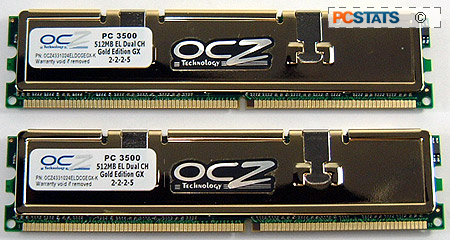 | |
The OCZ PC3500
DDR comes wrapped in gold plated copper heatspreaders which give each module
some heft, and help to insulate the DRAM from physical damage. OCZ also present consumers with a
warranty on this memory. If there are technical problems when installing the memory, consumers
can make use of the OCZ toll free 1-800
number for tech support. Having problems with a set of memory can be frustrating
enough if it happens, long distance charges on top of that only add to the
frustration. Giving the support number a ring, we were greeted by an actual person (imagine that!), after two
previous attempts within about 5 minutes of each other had led to a busy
signal.
Overclocking the OCZ PC3500 EL DDR!
|
| Overclocking Results: |
|
|
As usual
before we begin overclocking, I first lowered the CPU clock multiplier to 6x,
this way the processor will not hold the memory back in terms of overclocking.
Starting at 200 MHz and keeping 2-2-2-5 memory timings, I started to increase
the motherboard clock speed slowly in ~5 MHz intervals.
Things
began roughly for the PC3500 EL Gold Edition GX DDR memory, and at 217 MHz the
memory needed its voltage increased to 2.8V to run stably. After that was done,
the memory played quite nicely and I did not hit another snag until the 233 MHz
mark. At that speed the memory began to give us weird errors and cause the
system to crash back to desktop while running 3D tests. Increasing the voltage
slightly once more, this time to 3V, solved that issue. A voltage of 3V is high,
but the DFI motherboard is good up to 4V for memory! Just be careful of what you are
doing as high voltages can damage memory - if you are unsure do not go past
2.8V.
At 242
MHz the system started to show some signs of instability again, and this time we
increased the voltage to 3.2V. With that much voltage we were able to run the
OCZ EL PC3500 Gold GX DDR memory at a very nice 250 MHz with 2-2-2-5 timings.
The memory would not go above 250 MHz unfortunately and more voltage did not
help calm things down. Still 250 MHz while keeping 2-2-2-5 timings is a nice
accomplishment.
I was
also interested in seeing how well the memory would overclock with lax
timings.... but it didn't go all that far. With 3-4-4-8 timings, the maximum
speed we were able to overclock the OCZ memory to was 257 MHz. In this case, the
memory voltage did not play a key role. It was stable at this speed with 3V,
increasing the voltage just lowered the maximum overclockable speed. Now, on
with the benchmarks!






 RSS Newsletter
