BACK TO PCSTATS + Motherboards
+ Videocards
+ Memory
+ Beginners Guides
News & Advanced Search  Feedback?
[X]   Directory of
Guides & Reviews
The PCstats Forums

Nov. ShoppingList
Beginners Guides
Weekly Newsletter
Archived Newsletters

  Press Releases
  Tech Glossary
  Folding Team
  3DMark Team
  Forum Team

+70 MORE Beginner GUIDES....
Poll: Windows 7 Upgrade?
Are you planning on upgrading to Windows 7 on Oct. 28th?
Yes, Windows 7 Here I come!
No, Windows XP still works
No, Windows Vista still works
Total Votes:  3960

The Rydium Network
PowerColor Radeon X1550 512MB Videocard Review
PowerColor Radeon X1550 512MB Videocard Review - PCSTATS
Overall Rating:    74%
Abstract: If your PC has an older DirectX 7/8 videocard, you will need something that's at least DirectX 9 compatible to run Windows Vista Home Basic.

 mfg'r link     category     date published     author    
  Powercolor   Video Cards   Mar.19.07   C. Sun  


Usually when you move to a new Microsoft operating system a few tweaks are required of your computer to get the most out of it. More often than naught we'll add more system memory, perhaps a new CPU or hard drive may be required too. With Microsoft Windows Vista, you may need to buy a whole new computer if your existing hardware is too old... The minimum recommended specifications to run Microsoft Windows Vista are quite tame, but if you want to use any of Vista's new features, like AeroGlass, watch the hardware requirements shoot straight up.

For most of us, a new videocard and a top of system memory are the most common upgrades. If your PC has an older DirectX 7/8 videocard, you will need something that's at least DirectX 9 compatible to run Windows Vista Home Basic properly. Make that DirectX 9.0C and 128MB of video memory if you're planning on running the Windows Vista Home Premium, Business or Ultimate editions.

Luckily videocard manufacturers have recognized the need for a low cost DirectX 9.0C videocard with a lot of memory for the express purpose of making computers Windows Vista ready. Cost and functionality are the key points here.

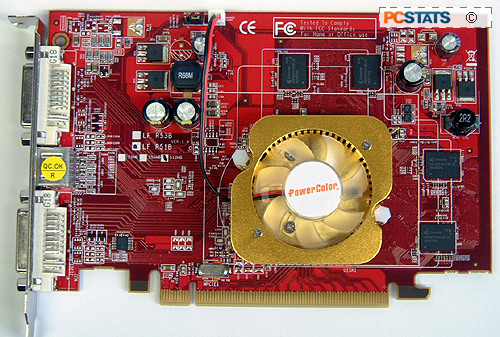
If you need an inexpensive DirectX 9.0C compatible videocard to make your PC Vista ready, PowerColor has what you are looking for. Its Radeon X1550 is a simple PCI Express x16 videocard with 512MB of DDR2 onboard memory. The PowerColor X1550 512MB videocard supports dual DVI monitors through its two DVI outputs, and TV output via a dongle. With a retail price of $116 CDN ($99 USD, £51 GBP), the PowerColor X1550 videocard is quite affordable.

PowerColor X1550 512MB DDR2 Videocard


Includes:

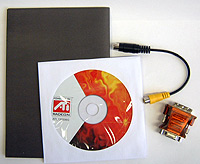
Driver CD, Utilities CD, Serious Sam II CD, S-Video Cable, Component Cable, 2x DVI to analog converters, 2x Molex to 6 pin power cables

At first glance the PowerColor X1550 512MB videocard is quite plain and refreshingly smaller than many of the videocards that have passed through PCSTATS' test labs recently. For 2D workstation use the PowerColor X1550 512MB is perfect little videocard, the two DVI outputs are perfect for two digital LCD monitors. If you're still using CRT monitors, there is one DVI to analog connector included.
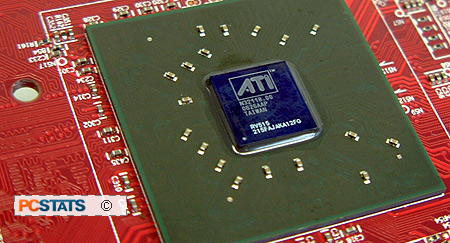
The PowerColor X1550 512MB videocard does not generate a lot of heat and the ATI Radeon X1550 VPU can be cooled with a small aluminum heatsink. PowerColor has a special version of its X1550 512MB with a "Silent Cooling System" but I have to say the regular X1550 512MB videocard is already pretty darn quiet.

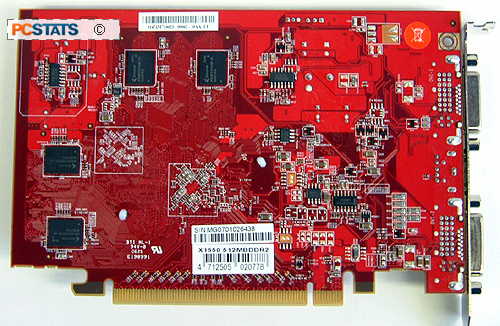
The 512MB of DDR2 memory does get warm to the touch, but nothing too alarming so it's okay to keep the memory naked.

The ATI Radeon X1550 GPU is based on the RV515 core (X1300) and is built on 80 nanometer manufacturing technology. The core speed has been increased to 600 MHz (from 450 MHz with the X1300) and the DDR2 memory comes clocked at 800 MHz (from 500 MHz with the X1300) no matter if you have a 256MB or 512MB version.

As mentioned earlier the Radeon X1550 is DirectX 9.0C compatible and with 512MB (for the PowerColor X1550 512MB) is fully Microsoft Windows Vista ready. Other standards it supports are OpenGL 2.0, Shader Model 3.0 along with AMD's AVIVO and H.264.

AMD AVIVO for High Definition Content

Despite an interesting name, AVIVO does not stand for anything specific. It is a collection of different video technologies that share a common name, like Centrino or ViiV for example. First and foremost, AMD's AVIVO includes a hardware accelerator for MPEG-2/DVD Microsoft Windows Media HD video standards (WMV HD) and H.264 standards.

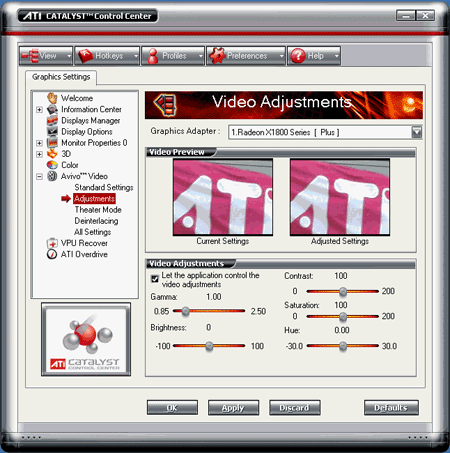
VIVO is built into the PowerColor X1550 512MB videocard and helps to enable such features as Home Theatre PCs (HTPC) or Personal Video Recorders (PVR) with the appropriate 3rd-party software applications. AVIVO can automatically adjust gamma and colour correction, and that should enhance picture quality too.

High Fidelity Colour allows for 10-bits per colour channel, which translated basically means a more vibrant picture. There is also a high quality 12-bit analog-to-digital converter to reduce picture noise as well.

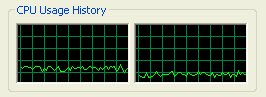
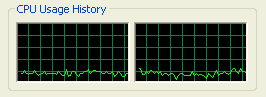
To test AVIVO's HD accelerating capabilities, we played a HD video through Windows Media Player 10 (the movie can be downloaded from Microsoft's WMV HD Content Showcase). The Discoverers (IMAX) video is available in both 720P and 1080P formats, and CPU utilization was monitored during playback through Task Manager to give a general indication of system load.

Running the 720P version of the Discoverers video uses between 15-18% of the processor resources, that's not too much and allows you to run applications in the background without much worry.

It's very surprising to see that the new generation of videocards run the higher bandwidth 1080P video at a lower CPU utilization than the 720P. CPU usage jumped between 11-16% here, and that leaves a lot of resources available for whatever you have in the background.

© 2009 PCSTATS.com Next Page >


 Page 1:  — PowerColor Radeon X1550 512MB Videocard Review
 Page 2:  Test System Specs and benchmarks
 Page 3:  Videocard Benchmarks: FarCry, Splinter Cell: Chaos Theory
 Page 4:  Videocard Benchmarks: Doom 3, Quake 4
 Page 5:  Videocard Benchmarks: FEAR, Conclusions
SEARCH PCSTATS NEW - TRY IT OUT!
Use the power of Google to search all of PCSTATS and the PCSTATS Forums. Tell us what you think of this new feature - FEEDBACK?

   20.11.09 | 10:06P
Hardware Sections 
· Beginners Guides
· Cases and Access.
· CD-ROMs
· Chipsets
· Computers / SFF PCs
· Cooling - Heatsinks
· CPU / Processors
· Digital Cameras
· Hard Drives
· Home Theatre
· Memory
· MP3 Players
· Monitors
· Motherboards
· Mouse Pads
· Networking
· Notebooks
· PCs and SFF PCs
· Peripherals
· Powersupply
· Printers
· Servers
· Software / OS
· Videocards
- - -
· Editorials
Industry PR 
» GIGABYTE Unleashes First UD7 Motherboard

» Seagate Ships 2TB ATA 6GB/s Hard Drive

» Corsair Obsidian Series 800D high-performance chassis


google
 
PCstats Network Features Information About Us Rydium Network
FrostyTech
TransmetaZone
BeginnersPC
RamFinder
ShoppingList Assistance
PCstats.com Newsletter
Tech Glossary
Technology WebSite Listings
About Us
Employment / Internships
Privacy Policy
PermaLink News
Archived News
Submit News (Review RSS Feed)
Site Map
PCstats Wallpaper
Rydium Network
Advertising

How's Our Driving?
© Copyright 1999-2009 www.pcstats.com All rights reserved. Privacy policy and Terms of Use.