Most of the hype these days surrounds Intel's P35 Express chipset, but if you have deep pockets and money is not an issue, you can get yourself an even sweeter platform.... How does PCI Express 2.0 and 1600 MHz FSB support sound? With the 45nm Intel Core 2 Quad 9xxx series processors available, DDR3 memory might finally start to prove its worth too. ;-)
Those two features may not make much of a difference right now but if you're a user who buys components for longer term use, it might be worth it to spend a bit more now so your computer doesn't go out of date as quickly. As with everything in the computer industry, new technology is introduced way ahead of time to address future issues. Current videocards may not use up the bandwidth available via a conventional PCI Express x16 slot, but manufacturers obviously think in the near future there will be strong demand for PCI Express 2.0.
Asus continually redefines its high end motherboard, the last several of which to pass through the PCSTATS labs have had a ton of features. We've seen special chips that split the PCI Express bus more evenly, small external LCD displays, watercooled chipset heatsinks, and boxes bursting with extra and accessories. Asus is really turning up the heat on the competition!
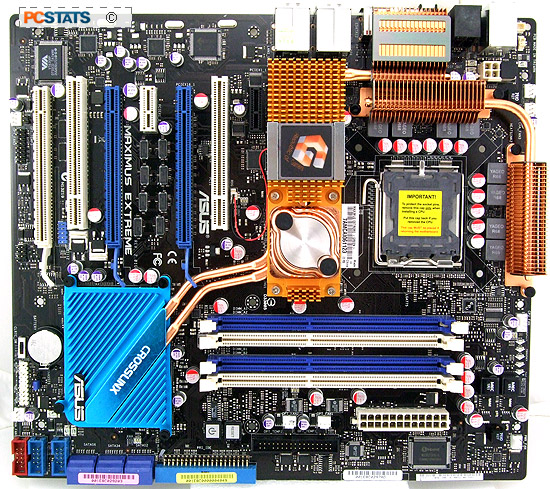
The Asus Maximus Extreme motherboard PCSTATS is testing
today is based around Intel's X38 Express and ICH9R
chipsets. It comes absolutely loaded with features, almost too much
in fact. You get the usual stuff like six SATA II ports (RAID
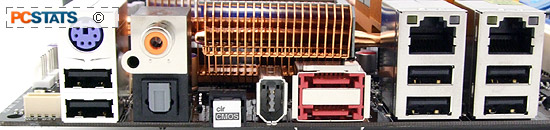
0,1,10,5,JBOD), 12 USB 2.0 ports, two eSATA ports, dual Gigabit network cards (with AI Net2 teaming support), IEEE 1394 and some Asus custom features like a rear panel LCD, loads of motherboard status LEDs and its signature watercooling compatible northbridge heatsink. That's right, the Asus Maximus Extreme is compatible with watercooling rigs by default! For expansion we find three PCI Express x16 slots for videocards, two PCI Express x1 slots and two 32 bit PCI slots. The three PCI Express x16 slots are broken down into PCIe x16 + PCIe X16, or PCIe x16 + PCIe x8 + PCIe x8 modes and support AMD Crossfire.
 |
|
Asus Maximus Extreme Motherboard |
|
|
|
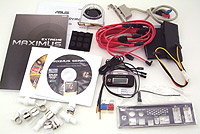
| Includes: |
| Driver CD's, User Manual, Ultra/133 IDE
Cable, Floppy Cable, 6x Serial ATA Cables, Molex to Serial
ATA Power Cables, audio card, 1x MOSFET fans, front panel IO headers,
rubber stands, LCD display, tubing
connectors, USB/Firewire bracket, backlit I/O shield, 3x
thermistors. |
 | | |
The Maximus Extreme motherboard supports Socket 775
Intel processors running on an 800/1066/1333/1600 MHz FSB, which means and is
compatible with Intel Celeron D, Pentium 4/D/XE and Core
2 Duo/Quad processors, including the new 45nm Penryn. Asus equips the Maximus Extreme with four DDR3 memory slots which can accommodate up to 8GB of DDR3-1333/1066 MHz memory (when overclocked, DDR3-1800/1600).
 With a retail price of $354 CDN ($354 USD, £171 GBP), the Asus
Maximus Extreme motherboard certainly commands a high price. Oh by the way, in
terms of software goodies, Asus bundles a copy of the game STALKER, and 3DMark06
advanced with the motherboard.
With a retail price of $354 CDN ($354 USD, £171 GBP), the Asus
Maximus Extreme motherboard certainly commands a high price. Oh by the way, in
terms of software goodies, Asus bundles a copy of the game STALKER, and 3DMark06
advanced with the motherboard.
Among the list of notable extras is a SupremeFX II
standalone 8-channel High Definition audio card, and a small mountain of
accessories. Asus takes
"big" to the next level with its Maximus Extreme motherboard. At 270 x
300 mm in size, the board is easily 30 mm wider than most other
full size ATX motherboards.
The large physical size of the motherboard may be a
problem if you plan on installing this
thing into a smaller case. I'd expect a person who buys this motherboard
to have a large stylish case, something like the Cooler Master Stacker 830 SE
would be nice. ;-)
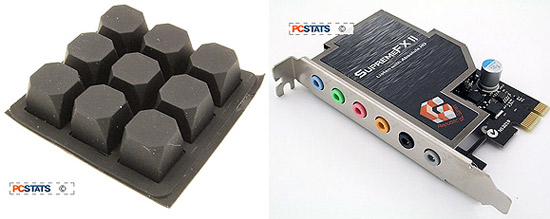
The Asus Maximus Extreme is absolutely packed full of features and other goodies. Asus bundles nine rubber pads with the motherboard and before you ask, they're for propping up the motherboard. At 1cm in height, the pads are too thick to use when installing a motherboard into case but for the enthusiast who runs their computer without a case, it's exactly what the doctor ordered. Makes setting the motherboard on top of the table or motherboard box much easier.
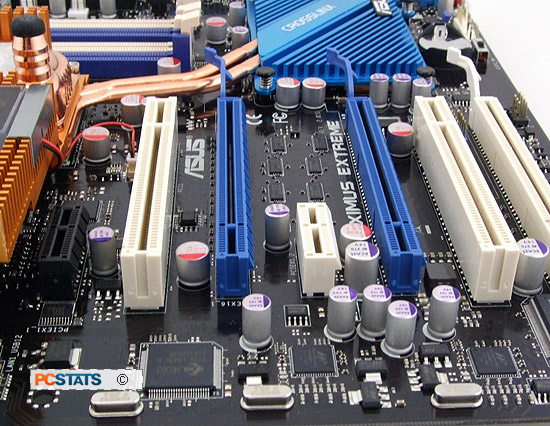
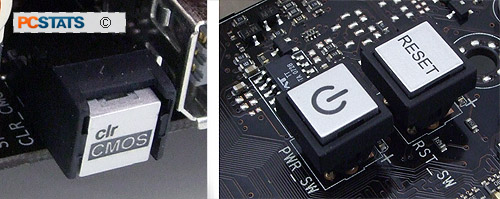
You'll also find hard Power and Rest buttons on the PCB. Both buttons light up when the motherboard receives power so even in the dark you can find things. Instead of having jumpers to short, there's a hard sliding Clear CMOS switch below the CMOS battery. There's also a Clear CMOS button on the rear I/O, handy if you can't access the switch near the battery.
There are a total of eight fan headers on the Asus Maximus Extreme motherboard with one is for the CPU, you have up to seven other headers for whatever you want to connect to the motherboard. There's an optional MOSFET heatsink fan that Asus includes in the package, it's recommended that you hook that thing up if you go with a passive form of cooling for the processor (like water or phase change cooling).
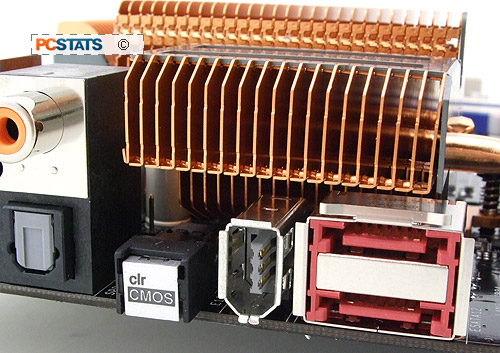
Asus have opted to use low ESR solid
state polymer capacitors on the Maximus Extreme motherboard. This kind of solid
capacitor has a longer lifespan than the electrolytic variety. As temperatures
increase inside the computer case, the lifespan of electrolytic capacitors
begins to decline. Compared to standard Electrolytic capacitors which use a
fluid electrolyte, the 'all-solid' style polymer capacitor last longer under the
same conditions.
The solid-state Low ESR conductive polymer capacitors are housed in very
distinguishable aluminum cans. The electro-conductive polymer capacitor does not
use electrolyte, so they will not dry out, leak, or suffer gas buildup and
burst, or leak. Good capacitors will not make your computer faster, but they can
ensure it runs reliably longer.






 RSS Newsletter
