Beginners Guides: Stopping Vista From Thrashing Hard Disks to Death
While your PC may be doing nothing, all of a
sudden you notice the hard drives are trashing around like the entire drive is
being copied. Never fear, PCSTATS is here to help you stop Windows Vista
from excessive hard drive usage, and show you how to free up some disk space too! -
Version 1.0.0
While many complaints about Windows Vista's sluggish performance can be attributed
to users with computer systems that are just not ready to run Vista well
(less than 1GB of memory is fairly painful with Microsoft's latest operating
system), it is clear that Windows Vista uses your computer's hard disk drive(s)
much more intensively and extensively than Windows XP ever did. This results in
some truly disturbing disk thrashing at times, even on high-end computers.
It has eventually become apparent that most of this is by design. The disk
thrashing action is the result of processes that work behind the scenes and does
not affect overall performance much, unless your system is low on RAM. The
long term affects of wear and tear on your hard drive though, are another thing
entirely.
In this PCSTATS Beginners Guide we will explore the reasons and culprits behind Windows Vista's
high disk usage, and explore ways to not only reduce the noise and activity, but
also save and reclaim drive space Vista is using for features that you may not
want.
Inside the thrashing: What's using your drive
cycles?
First, let's take a closer look at the Windows Vista services and programs
which cause the most drive activity, then look at ways to tame them and free
your drives.
The daily Grind: Windows Vista file
Indexing
Windows Vista, like XP before it, builds itself an index file, which contains markers to all files
and folders in certain locations on your disk (User folders, the Desktop, Program
Files, etc.). To do this, it must churn through the hard disk
searching and indexing each and every last file. Vista periodically
rebuilds this index, causing further drive thrashing. By default, the
files within your 'user' directory (Vista's equivalent of XP's 'C:\documents and
settings\username' which contains your documents folder and your desktop) are
indexed.
There are a couple of ways to reduce the disk overhead that the indexing feature
imposes. The obvious and more drastic method is just to turn drive
indexing off. In Windows XP, this was almost an automatic step when
tweaking the operating system, since the indexing feature was next to
useless anyway. With Windows Vista's enhanced search features, you may want
to think twice about this if you have, or expect to have a large amount of data
(in terms of number of files) stored on your computer. Indexing does
make searching for files and folders quite a bit faster, but searches do still
work with the same results without indexing. They may just take
longer.
To turn the indexing feature off in Windows Vista, open the 'start' menu and
type 'services' in the search bar. Hit ENTER.
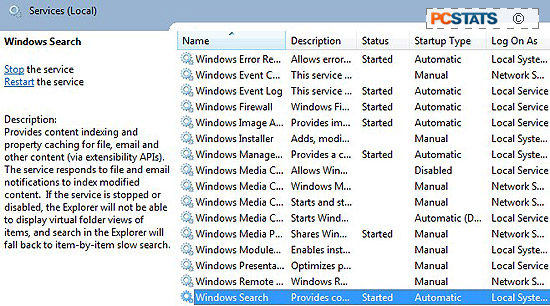
In the services window, scroll down until you reach the 'windows search'
service. Right click it and hit 'properties'.
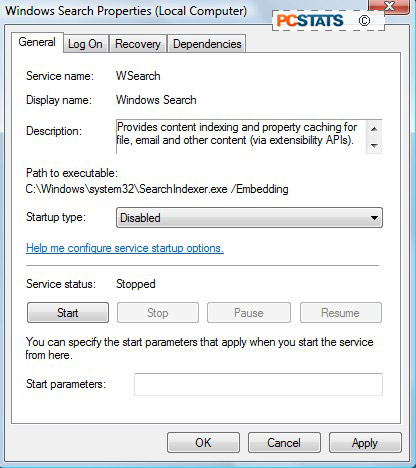
In the 'startup type' dropdown box, change the value to 'disabled', then
click the 'stop' button below to stop the service immediately. Hit
'ok.'
If you don't want to disable indexing entirely, consider altering its
function to make it index less files, keeping only what you are likely to search
for. Windows Vista allows you to get very specific about what types of files
will be indexed.






 RSS Newsletter
