There are a lot of choices out there, and hoosing one solely depends on what you are planning to do with your computer now, as well as what you are planning to do with your computer in the future.
InWin Q500 ATX Full Tower Case
Buying a computer case can be one of the most important
decisions you have to make in the process of building your own system. There are
a lot of choices out there, and choosing one solely depends on what you are
planning to do with your computer now, as well as what you are planning to do
with your computer in the future.
If you computer needs are modest now, and by that I
mean, if you just have the standard peripherals, one hard drive, one CD-ROM,
floppy drive, and if you are not planning to upgrade in the future, then
choosing just any ol' case will probably do the job. If you have special needs
like three or four hard drives, a couple of CD-ROMs, and/or a CD-R then you
would want to have a large case to accommodate all your peripherals.
Additionally, another important consideration would be whether or not you are planning in getting inside your computer on a regular basis to tweak with things. If that's your plan, you will certainly want a case that has ample room, as well as features that make it convenient for you to swap out motherboards, CD-ROMs, hard drives, modify jumper settings and generally accomplish things of that nature. As far as the future is concerned, you will certainly want a case that will be able to handle the upgrade path you will choose to take.
The InWin Q500 ATX full tower case is certainly not a case for people with modest needs. As a matter of fact, there's nothing modest about this case. This is a case for power users. Plain and simple. Let's take a look at it more closely.
The Specs
Dimensions: 600 mm * 200 mm * 432 mm (H*W*D) Disk space: 5 * 5.25", 1 * 3.5"(internal:5 * 3.5") Weight: N.W. 12.60 kg (27.60 lb), G.W. 13.60 kg (30.00 lb) Mainboard: Baby - AT style, ATX FORM FACTOR, Full Size AT style. Security: Padlock Option Meets CE, FCC
First Impressions
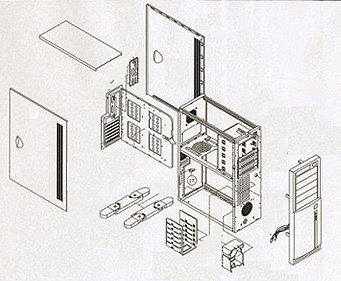
The InWin is a full tower ATX case with a 300 Watt power supply. It features five 5 1/4" drive bays, six 3 1/2" drive bays, a drawer style sliding motherboard tray, and a removable hard drive cage. The case cover consists of three removable panels, one on top and the rest on the sides, which after removing the one screw that holds them in place, they slide out quite easily. The case stand consists of four plastic legs, which swing out for better stability and support.
The front panel accommodates the
main power switch, a reset switch, a power LED and no less than two hard drive
LEDs. I guess they are expecting you to put a lot of hard drives in that case.
The first thing that crabs your attention about the case, is its sheer size.
Being a full tower, a big size comes with the territory.
This is definitely not a case that you will be
taking with you to local LAN parties. The inside of the case has more than
enough room for even the most demanding of users. There is a slot right above
the power supply for an additional power supply complete with screw halls and
vents. The very top of the case accommodates two of the six 3 1/2" bays. One of
them is for your floppy drive, and the other is for an additional hard drive.
That is after you have completely filled out your hard drive tray at the bottom
of the case. Below you will find the mechanical drawing of the case. You can
clearly see how it comes apart.
This diagram came with the case, so I scanned it and modified it to fit my needs for this review. I believe the manufacturer's site has a similar diagram on-line.






 RSS Newsletter
