Personal Digital Assistants (PDA's) are nothing new - they have been around in one form or another for several years now from a handful of companies. What is relatively recent however, is the adoption of full colour LCD screens on these little wonders of mobile organization.
The evolution from black and white LCD displays has also opened the door for a host of peripherals which take advantage of the new colour capabilities to drastically increase the usefulness of the device. These add-on peripherals can be inserted into the handspring visor through its springboard expansion port - transforming the simple PDA into anything from an MP3 player to mini photo studio to GPS receiver.
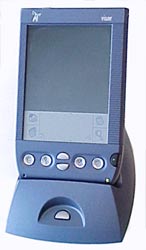
| HandSpring Visor Prism |
|
|
Cradle, USB connectedCD-ROM Drivers and SoftwareInstructionsAC adapterProtective Cover
Stylus Cost: $400USD
Manufacturer: Handspring |
Now depending on your personal preferences and needs, a PDA either ranks in at 'abosolutly necessary', or 'paper weight'. Some people are just more accustomed to using billions of little post-it notes to keep their life in order, and the move to an all digital assistant can be both a tough changeover, and an incredibly time-saving experience.
Taking the plunge into the world of digital notes can be frightening, but there are quite a few built-in features in the Visor Prism that will help make such a transition as smooth as possible.
Write like a chicken
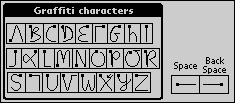
The most obvious feature of any Palm-like device is the Graffiti writing
system. Contrary to devices like the Blackberry which use a small (and fast mind you) keyboard to enter text and characters into the unit, the Visor Prism uses a touch sensitive screen, stylus and a custom manner of writing. Called Graffiti, the characters are based upon traditional mannerisms of human writing and shorthand. Thus the device places most of the onus on the user to learn the interface language.
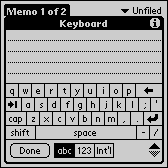
Of course the Prism still has a fair amount of work to do interpreting the chicken scratches that people are opt to create. Still, this short-hand manner of writing is fast use, simple to learn, and based on inherent characteristics found in most people's writing style. Best of all, an on-screen keyboard is always a click away should you get yourself into trouble and forget the difference between writing an "e" and a "k".
Of course if you are familiar with the PalmPilot you
will instantly recognize the date book, address book, to do list, and memo pad
buttons on the Prism. Additionally, the writing area is surrounded by the
same four familiar application icons; application, menu, calculator and memo pad.
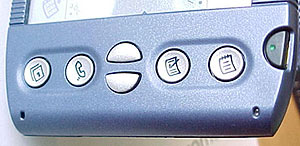
If you happen to notice the two small holes on either side of the base you
would be forgiven for thinking they were part of the manufacturing process. In
fact the left hand hole hides a microphone so that the Prism can record voice
messages, or even act as a cellphone with the proper expansion module. The right
hand hole is simply an LED in disguise.






 RSS Newsletter
