Beginners Guides: Converting Videotape Into Video Files
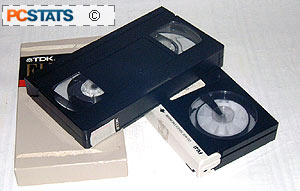
Break out
the BETA and VHS tapes, it's time to convert those old home movies into video files you can email around the world, and publish on the web in all their digital splendor! - Version
1.1.0
As you may have noticed, the VCR is a dying technology. DVD
players are now equivalent in price, and their disks have practically crowded VHS
tapes right off the shelves of your neighborhood video store. Give it another
three years and you may be hard pressed to find a new
release on tape. So what happens when your VCR finally breaks?
You'll replace it with a DVD player, if you haven't
already. That's all well and good, but what about your library of home videos
that you've accumulated? Sure the tapes will last for a good 10-20 years before
the magnetically recorded data starts to disintegrate, but who says that there
will be anything out there that can play them in twenty years…?
In this PCstats Guide, we'll provide some simple
guidelines to converting your old videotapes into video clips that you can
store on your computer, or send around to friends and family. Once you have converted your old
videotapes into the new digital format, you have several options open to choose from.
You can store your flicks on the hard drive indefinitely, or place them on
a recordable CD-R/RW for storage.
 If you have a
DVD writer, you can even burn your entire collection onto a DVD, and play those
movies back on your home DVD player.
If you have a
DVD writer, you can even burn your entire collection onto a DVD, and play those
movies back on your home DVD player.
As a final plus, CDs and DVDs take up a heck of a
lot less space than VHS, or BETA if you're really old school! We will be
publishing an article soon on creating video CDs and DVDs from video files, so
stay tuned as PCstats will shortly be covering those topics.
This guide assumes that you
have both a VCR (VHS, Betamax, Hi-8, etc.) and a graphics card that is
capable of doing video capture. Most recent mid-to-high-end video cards from
Nvidia and ATI have this feature, which is technically referred to as "Video
In," or sometimes VIVO if the card supports both video input, and output.. If
you are not sure, consult your documentation and the card manufacturer's
website.
You will also need a reasonably recent PC, hopefully not slower
than 500Mhz with a decent amount of memory. Your results may vary depending on
your setup. An S-video or RCA composite cable is required to connect the VCR to your
video card, and a converter from a dual or single RCA Left/Right audio cable to
a single mini stereo jack is required to hook the VCR up to your sound
card for audio capture.
Lastly, you'll need quite a bit of hard disk space,
depending on how much video you want to capture. We recommend at least 40-80GB
of free space, though you can obviously experiment with less.






 RSS Newsletter
