Memory Bandwidth vs. Latency Timings
All memory is not created equal, nowadays you need to know which 'flavour' is best for an Intel or AMD PC if you expect the best performance back from your investment. - Ver. 1.1
When
Intel released the i865PE/i875P dual channel core logic alongside the Intel
Pentium 4C processors, the
memory
game changed forever. With a DDR memory controller now capable of running
dual channel, the Pentium 4 was
no longer to be bandwidth limited as it had been with the i845 series. Those
single channel DDR chipsets, like the i845PE for instance, could only provide half the
bandwidth required by the Pentium 4 processor due to its single channel memory controller.
As the new 800 MHz FSB Pentium 4 processors allowed
users to hit never before seen highs in terms of bus speed, many memory
manufacturers were trying to capitalize on the situation by releasing every
increasing degrees of "high speed" memory.
Unfortunately, to run the memory frequency at the same
speed as the FSB (or a 1:1 ratio) almost all the high speed DIMM's (Dual Inline
Memory Module) have to have very lax timings.
Often, these times are as low as 3-4-4-8!
Think about it this way, a car built for drag racing can
go dead straight super fast, but cannot maneuver as well as an F1 race car.
Likewise, the F1 racer is good in the corners but will be left in the dust on
the drag strip. In other words, today's high speed memory modules are built for one thing only, and that's top speed,
where timings really aren't considered all that much.
As we've mentioned in numerous PCstats reviews, memory timings play a key
role in terms of overall system performance. More so in 3D based applications
which do not need a great deal of bandwidth, but rather quick access
between the various pieces of hardware within the computer.
Confused
about memory timings?
When one talks about memory timings they're basically talking about how long
the system has to wait for the memory to be in a ready state before data is
fetched or delivered.
 You could think about memory
timings as people working at a drive through restaurant; you place
your order then wait for the food to be ready. The lower the timings are, the
faster the computer (and quicker your order comes) is able to get data from
the memory, and the faster the rest of the PC will ultimately be.
You could think about memory
timings as people working at a drive through restaurant; you place
your order then wait for the food to be ready. The lower the timings are, the
faster the computer (and quicker your order comes) is able to get data from
the memory, and the faster the rest of the PC will ultimately be.
This rule of thumb applies whether you're on an Intel or AMD based system. As
for why there aren't lower timings then 2-2-2-5, JEDEC (the memory governing
body) does not think it's possible for current dynamic memory technology to run
at 0 or 1.
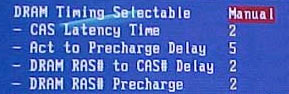
When we refer to timings it is common to quote a four digit number separated
by dashes (ie. 2-2-2-5) The first number always represents CAS (Column Address
Strobe) Latency as it's usually the most important.
Next in line is RAS-to-CAS Delay (Row Address Strobe), RAS Precharge and
Act-to-Precharge Delay (which is always the final, and largest number).
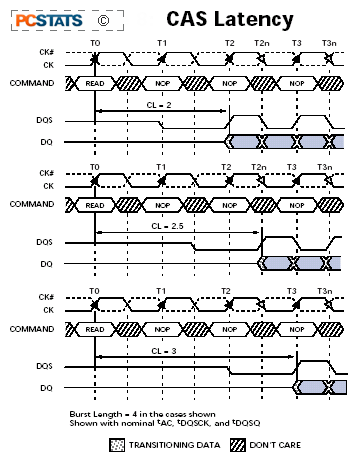
In the picture to the left here, we can see the the
timing diagram from some Crucial DDR333 memory. If we take this as an example
for all subsequent memory speeds, I think we should be able to illustrate just
what all these 'timing' numbers really represent.
The diagram shows timings of CAS2, CAS2.5 and
CAS3 timings (marked as CL=2 for example). Note the vertical dashed lines which
indicate a rise or fall of the clock signal, since this is double data RAM,
there are two such points per 'Time unit'.
CAS latency is the delay between the registration of a
read command and the availability of the first piece of output data. CAS latency
is measured in clock cycles. In the last of the three examples, a read
command which is registered at T0 (Time=0) is not valid until T3 (Time=3).
 With all things equal, a stick of
DDR memory capable of running 2-2-2-5 will make the computer operating
experience seem faster than a DIMM which may only run at 3-4-4-8. This is
because the delay from when the memory receives an instruction, retrieves the
data, and sends it back out is less.
With all things equal, a stick of
DDR memory capable of running 2-2-2-5 will make the computer operating
experience seem faster than a DIMM which may only run at 3-4-4-8. This is
because the delay from when the memory receives an instruction, retrieves the
data, and sends it back out is less.
Where it starts to get confusing is when you
has the choice of buying high speed memory with slow
timings. Just about ever PC3700+ rated memory module we've seen
uses conservative timings after all. If your answer would be to buy
fast memory with tight timings,
I'm
afraid you're going
to be disappointed as there are no such modules available yet. So, why are we
still interested in fast memory with slow timings then? Well, the answer goes something
like this....





 RSS Newsletter
