Many browser hijackers are
also identified and stopped by anti-virus software packages. Running Norton
Antivirus with 'auto-protect' enabled is a good idea as a security measure, and
there are many other equivalent antivirus programs that can help.
Use antivirus 'auto protection'
Many AV programs come with a
program that constantly scans information entering and leaving your computer for
viruses and malware. Norton's 'auto-protect' is one example of this. While they
can occasionally cause trouble with installing and running software, these
programs are your friends when it comes to protecting your PC from browser
hijackers and Trojan horse viruses contracted from websites. Make sure your
antivirus package has an equivalent feature up and running.
Keep an anti-hijack 'toolkit' for
emergencies
There are several free
programs available which will help you recover your system in the event of a
hijacked browser. Ad-aware and Spybot, which we covered above, are two of them.
In addition, download and store Hijackthis and CWShredder (google search for these, the old URLs are no longer valid). Both of these programs can help you recover in the case of an
emergency. We will detail their use in the second part of this article. A
reputable Antivirus program like those provided by Norton, MacAfee or Panda is
also essential, as many browser hijackers are considered to be 'Trojan horse'
viruses and can be detected and removed by antivirus software.
Change your Internet Explorer security
settings
IE contains some security
features which can be used to ward off annoying malware like browser hijackers.
Open Internet Explorer, go to the 'tools' menu and select
'Internet options.'
Now select the 'security' tab.
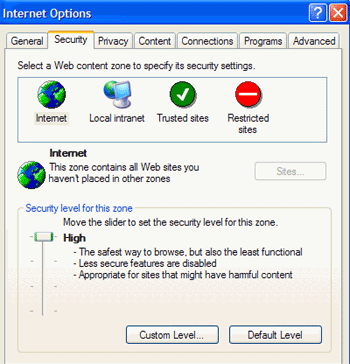
If you
want the highest degree of protection against browser hijackers and other
malicious online code, set your Internet zone to the 'high' security setting.
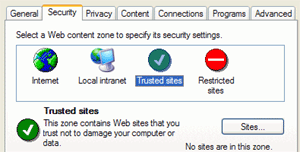 This will ensure that IE does not run activeX instructions, the
means by which most browser hijackers get access to your computer.
This will ensure that IE does not run activeX instructions, the
means by which most browser hijackers get access to your computer.
Note that
this may also cause problems and missing content in some legitimate
web pages.
To get around this, you can place trusted websites
that you regularly visit into the 'trusted sites' Internet zone.
Site
addresses that you enter here will be mostly unrestricted, allowing them to
display their content properly.
Try an alternate browser
The best way to defend against
many browser hijackers is to stop using Internet Explorer altogether. Since a
majority of these programs are coded specifically for IE, switching browsers
will render them harmless. Consider Mozilla as one alternative.





 RSS Newsletter
