BACK TO PCSTATS + Motherboards
+ Videocards
+ Memory
+ Beginners Guides
News & Advanced Search  Feedback?
[X]   Directory of
Guides & Reviews
The PCstats Forums

Beginners Guides
Weekly Newsletter
Archived Newsletters

+70 MORE Beginner GUIDES....
Poll: Windows 7
Have you Upgraded to Windows 7?
yes, love it!
nope, staying put
yes, but not happy
Total Votes:  809

 
 [NEW!] 
Gigabyte GA-P55A-UD4P Intel P55 Express Motherboard Review
Beginners Guides: Browser Hijacking & How to Stop It
Beginners Guides: Browser Hijacking & How to Stop It - PCSTATS
Marketplace: $/£/€ Price Search
Abstract: If you though Pop-ups were annoying, just wait until your web browser is hijacked! In this guide, PCstats shows you how to regain control and kick out the hijackers, kung-fu style...
 Manufacturer:  Category:  Published:  Author: 
  PCstats.com   Beginners Guides   May.10.2004   Mike D.  

Manual system search; HOSTS file

If none of the above methods have eliminated your problem, the next step is a manual search through several areas of your system, looking for signs of the offending program. To do this: First go to the control panel and open 'add or remove programs.' Look for any suspicious entries here (software you don't recognize, or which is named oddly or contains links to the problems you are experiencing.) and remove them.

Empty the recycling bin.

Open the HOSTS file by launching a Notepad window and opening the 'C:\WINDOWS\SYSTEM32\DRIVERS\ETC\HOSTS' file. Note that the HOSTS file has no extension, so it will not appear as a text file. You will need to change the 'files of type' dropdown box to 'all files' in order to see it.
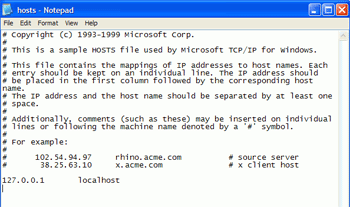
The HOSTS file provides a means for your system to resolve DNS addresses (like www.pcstats.com ) into IP addresses for transferring data across a network or the Internet.

Typing the addresses from the right hand column into your browser will result in it being directed to the IP address to the left of that address. In this way, a browser hijacker can divert traffic automatically from legitimate pages to those of its own choosing, since your computer will check its own HOSTS file for data on an address you enter before it asks your Internet Service Provider's DNS server for information.

The only entry in a normal HOSTS file should be

'127.0.0.1 localhost'

Unless you have customized it yourself or your computer is part of a network which is managed by someone else. Note that in some cases, other programs such as Norton's email protection software may insert their own entries into the hosts file. What you are looking for is a diversion of commonly used websites or Internet Explorer search functions to a specific valid IP address.
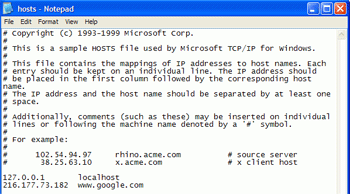
The picture above shows a HOSTS file with a foreign entry which would redirect a browser to the IP address '216.177.73.182' if 'www.google.com' was requested. Eliminate any foreign entries and save the file.

< Previous Page © 2010 PCSTATS.com
Please respect the time and effort that went into creating each PCSTATS Beginners Guide, do not illegally copy. Thank you.
Next Page >

Toss Some Change into The Tip Jar
For less than the cost of a latté you can let the hardworking staff who write and maintain the GUIDES at PCSTATS know that we've helped you out of a jam, or dished out a bit of great tech advice. Toss in $3 bucks, or whatever spare change you like.
 Pg 1.  Beginners Guides: Browser Hijacking & How to Stop It
 Pg 2.  The worst case scenario
 Pg 3.  Use Anti-virus programs regularly
 Pg 4.  Repairing a browser hijack
 Pg 5.  Antivirus Scan in safe mode
 Pg 6.  — Manual system search; HOSTS file
 Pg 7.  Manually Checking the registry
SEARCH PCSTATS NEW - TRY IT OUT!
Use the power of Google to search all of PCSTATS and the PCSTATS Forums. Tell us what you think of this new feature - FEEDBACK?

   09.02.10 | 4:36P
Hardware Sections 
· Beginners Guides
· Cases and Access.
· CD-ROMs
· Chipsets
· Computers / SFF PCs
· Cooling - Heatsinks
· CPU / Processors
· Digital Cameras
· Hard Drives
· Home Theatre
· Memory
· MP3 Players
· Monitors
· Motherboards
· Mouse Pads
· Networking
· Notebooks
· PCs and SFF PCs
· Peripherals
· Powersupply
· Printers
· Servers
· Software / OS
· Videocards
- - -
· Editorials
Industry PR 
» GIGABYTE Unleashes First UD7 Motherboard

» Seagate Ships 2TB ATA 6GB/s Hard Drive

» Corsair Obsidian Series 800D high-performance chassis


google
 
PCstats Network Features Information About Us Rydium Network
FrostyTech
TransmetaZone
BeginnersPC
RamFinder
ShoppingList Assistance
PCstats.com Newsletter
Tech Glossary
Technology WebSite Listings
About Us
Employment / Internships
Privacy Policy
PermaLink News
Archived News
Submit News (Review RSS Feed)
Site Map
PCstats Wallpaper
Suite66 Advertising Agency
Advertising

How's Our Driving?
© Copyright 1999-2010 www.pcstats.com All rights reserved. Privacy policy and Terms of Use.