BACK TO PCSTATS + Motherboards
+ Videocards
+ Memory
+ Beginners Guides
News & Advanced Search  Feedback?
[X]   Directory of
Guides & Reviews
The PCstats Forums

Beginners Guides
Weekly Newsletter
Archived Newsletters

+70 MORE Beginner GUIDES....
Poll: Windows 7
Have you Upgraded to Windows 7?
yes, love it!
nope, staying put
yes, but not happy
Total Votes:  803

 
 [NEW!] 
Gigabyte GA-P55A-UD4P Intel P55 Express Motherboard Review
Beginners Guides: Ten Steps to a Secure PC
Beginners Guides: Ten Steps to a Secure PC - PCSTATS
Marketplace: $/£/€ Price Search
Abstract: With this guide, PCstats has set out to inform you clearly and concisely of the dangers you face.
 Manufacturer:  Category:  Published:  Author: 
  PCSTATS   Beginners Guides   Aug.29.2007   Mike D.  

The Cure to Step 2.

The cure: Use a firewall program or device.

A firewall is a software program or hardware device which blocks remote access to your computer. It does this by closing all ports to data unless the communication is initiated from inside the firewall first. So you could, for example, surf this page without problems through a firewall since your computer sends the request for data to our web server first.

The firewall would note the Internet address that your request was sent to, and allow return communications from that specific address back through the firewall. However, anyone trying to scan a range of IP addresses for vulnerable computers would turn up a blank for your address, since the firewall blocks all unsolicited communication from the Internet.

Almost all home Internet sharing devices include firewalls, so if you are using a router to share your Internet connection within your home, you are likely already protected. Otherwise you need to use a software firewall. Windows XP comes included with one, though you need to activate it. Several free third-party software firewalls are also available, most notably Zone Lab's Zonealarm.

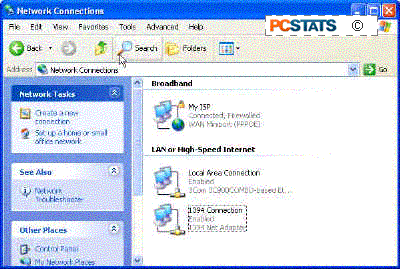
To activate the Windows XP firewall go to 'start/control panel/network and Internet connections/network connections' then right click on your Internet connection and select 'properties'.
PCSTATS

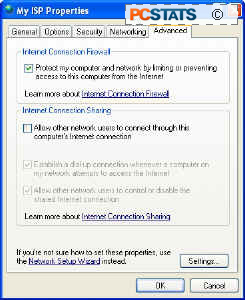
Go to the 'advanced' tab and check the 'internet connection firewall' box.
PCSTATS

The windows XP firewall is now active and will block most non-requested data from entering your system.See PCSTATS Beginner's guide to Firewalls and Internet security for more details on configuring the XP firewall.

If you have installed Service Pack 2 for Windows XP, the firewall works a little differently. Unless you have another form of firewall software like Zonealarm installed, the XP firewall should be active by default.

To check this, go to 'start\control panel\windows firewall' and ensure that the firewall is set to the 'on (recommended)' position. The 'windows firewall' icon in control panel is only available to Service Pack 2 users, so if it's not there, simply follow the directions given in the last paragraphs. For more information about the changes to Windows XP made by Service Pack 2, see PCSTATS article on WinXP-SP2 right here.


< Previous Page © 2010 PCSTATS.com
Please respect the time and effort that went into creating each PCSTATS Beginners Guide, do not illegally copy. Thank you.
Next Page >

Toss Some Change into The Tip Jar
For less than the cost of a latté you can let the hardworking staff who write and maintain the GUIDES at PCSTATS know that we've helped you out of a jam, or dished out a bit of great tech advice. Toss in $3 bucks, or whatever spare change you like.
 Pg 1.  Beginners Guides: Ten Steps to a Secure PC
 Pg 2.  The Cure to Step 1.
 Pg 3.  — The Cure to Step 2.
 Pg 4.  Step 2 Con't
 Pg 5.  Step 3
 Pg 6.  The Cure to Step 4
 Pg 7.  Step 5
 Pg 8.  Step 6.
 Pg 9.  The cure to Step 8
 Pg 10.  Step 9
 Pg 11.  Step 10
SEARCH PCSTATS NEW - TRY IT OUT!
Use the power of Google to search all of PCSTATS and the PCSTATS Forums. Tell us what you think of this new feature - FEEDBACK?

   09.02.10 | 10:19A
Hardware Sections 
· Beginners Guides
· Cases and Access.
· CD-ROMs
· Chipsets
· Computers / SFF PCs
· Cooling - Heatsinks
· CPU / Processors
· Digital Cameras
· Hard Drives
· Home Theatre
· Memory
· MP3 Players
· Monitors
· Motherboards
· Mouse Pads
· Networking
· Notebooks
· PCs and SFF PCs
· Peripherals
· Powersupply
· Printers
· Servers
· Software / OS
· Videocards
- - -
· Editorials
Industry PR 
» GIGABYTE Unleashes First UD7 Motherboard

» Seagate Ships 2TB ATA 6GB/s Hard Drive

» Corsair Obsidian Series 800D high-performance chassis


google
 
PCstats Network Features Information About Us Rydium Network
FrostyTech
TransmetaZone
BeginnersPC
RamFinder
ShoppingList Assistance
PCstats.com Newsletter
Tech Glossary
Technology WebSite Listings
About Us
Employment / Internships
Privacy Policy
PermaLink News
Archived News
Submit News (Review RSS Feed)
Site Map
PCstats Wallpaper
Suite66 Advertising Agency
Advertising

How's Our Driving?
© Copyright 1999-2010 www.pcstats.com All rights reserved. Privacy policy and Terms of Use.