Step 5. Update update update
The Danger: Viruses and malicious
users may exploit newly discovered security holes within Windows and Internet
Explorer.
The Cause: Windows XP is
an extremely complex operating system, and as such has a number of bugs and
design holes which are constantly in the process of
being fixed by Microsoft. On the other side of the fence,
there are users who are enthusiastically trying to discover these flaws, either for the purpose of
informing Microsoft or just for the heck of it.
Generally, major vulnerabilities or flaws are
patched almost immediately after their existence is made known, or even before.
However, users who do not update their systems with the new patch are at the
mercy of anyone using software tools designed to exploit the vulnerability.
A recent example of this would be the infamous
'blaster' worm which used a weakness in Window's RPC (Remote Procedure Call)
handling to infest an enormous number of systems across the world. Once on
a system, the virus could spread itself out to other vulnerable PCs and also
force its host to shut down automatically. Microsoft quickly patched the
security hole and provided a tool to remove the worm, but since many users did
not patch their systems, the infestation spread and slowed down Internet traffic
worldwide.
The Cure: Keep your Windows computer
up-to-date with the latest Microsoft security patches.
Windows XP includes an automatic updating feature
which will periodically check Microsoft for updates and download them to your
system, ready for installation. To use automatic update, right click on 'my computer' and select properties,
then choose the 'automatic updates' tab.
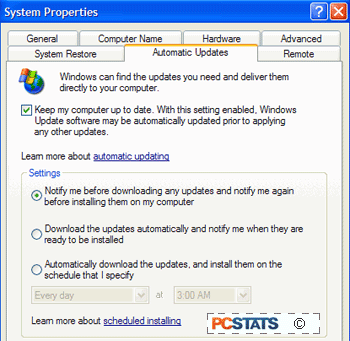
If it is not already, check the 'keep my computer
up to date…' checkbox to enable automatic updating.  Now run Windows update from 'start\all
programs\windows update' to make sure you are fully patched for now.
Windows update will now periodically check
Microsoft's site for updates and download them to your PC. You will be
prompted with an icon in the task bar when new updates are available.
Now run Windows update from 'start\all
programs\windows update' to make sure you are fully patched for now.
Windows update will now periodically check
Microsoft's site for updates and download them to your PC. You will be
prompted with an icon in the task bar when new updates are available.
Advanced security steps: The following five procedures will provide you with
an extra blanket of security to complement the essential changes you just made
to your system.






 RSS Newsletter
