BACK TO PCSTATS + Motherboards
+ Videocards
+ Memory
+ Beginners Guides
News & Advanced Search  Feedback?
[X]   Directory of
Guides & Reviews
The PCstats Forums

Beginners Guides
Weekly Newsletter
Archived Newsletters

+70 MORE Beginner GUIDES....
Poll: Windows 7
Have you Upgraded to Windows 7?
yes, love it!
nope, staying put
yes, but not happy
Total Votes:  809

 
Gigabyte GA-P55A-UD4P Intel P55 Express Motherboard Review
Beginners Guides: Flashing a Motherboard BIOS
Beginners Guides: Flashing a Motherboard BIOS - PCSTATS
Marketplace: $/£/€ Price Search
Abstract: Upgrading the BIOS (Basic Input Output System) of your computer's motherboard, also sometimes called flashing, used to be a complex operation full of potential perils for your PC.
 Manufacturer:  Category:  Published:  Author: 
  PCstats Guide   Beginners Guides   Jun.30.2004   Mike D.  

Automatic BIOS Update Programs

Almost all motherboard manufacturers offer a utility that will give you the exact model and BIOS revision date of your board. MSI has their "Live Update" program, Aopen their "Aoconfig" software, and so on. Generally this utility will come included on the CD bundled with the board, but failing this, you should be able to download the company specific software from the manufacturer's site under the 'utilities' or 'tools' category.

Here's some links to Asus, MSI, ABIT and Gigabyte's BIOS support pages to get you started. If you don't know the website of your motherboard manufacturer, have a look below, or run a search through Google.

Motherboard Manufacturer Websites
Albatron http://www.albatron.com.tw Soltek http://www.soltek.com.tw/
Abit http://www.abit.com.tw/ Tyan http://www.tyan.com
Asus http://www.asus.com.tw/ Transcend http://www.transcend.com.tw/
Gigabyte http://www.gigabyte.com.tw/ Shuttle http://www.spacewalker.com/
Soyo http://www.soyousa.com/ Epox http://www.epox.com.tw/
MSI Computer http://www.msicomputer.com/ DFI http://www.dfi.com.tw
Iwill http://www.iwillusa.com/ DTK http://www.dtk.com.tw/
Aopen http://www.aopen.com.tw/ ECS http://www.ecs.com.tw
FIC http://www.fic.com.tw/ Biostar http://www.biostar.com.tw
Chaintech http://www.chaintech.com.tw/ Acorp http://www.acorp.com.tw
Intel http://www.intel.com Foxconn http://www.foxconnchannel.com

Once you find the website for the maker of your motherboard, look around for their BIOS update tool, if they have one. If they do, download, install and run this program to find the exact make and model of your board.
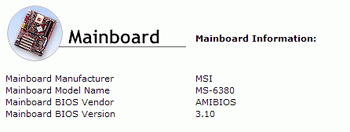
As an example of what to expect, at right is a screen shot from MSI's software to give you an idea of what you are looking for.

Once you have the exact BIOS revision number which is currently being used by your PC, we next need to find out what BIOS revisions are available for your motherboard. In most cases, you can go directly to the manufacturer's product page for the board for a link to the available BIOS downloads. Also check the downloads, or support sections of their website.
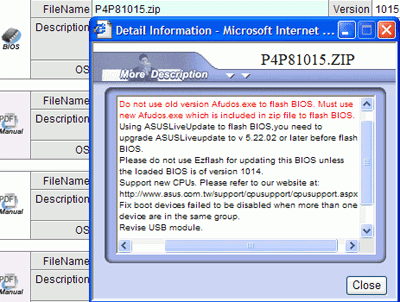
Some of the software utilities, for example MSI's Live Update, will search for BIOS and driver updates for you, and handle the downloads.

For the most part though, you'll have to take the information you have learned about your motherboard model, and BIOS revision and go hunting through the manufacturers website. When you find the page with the BIOS updates for your particular motherboard, select the latest update and download it to your desktop. Generally speaking, if your board is using BIOS revision 3.10, you will want to download a later revision; this could be 3.10b, or 3.22 as an example.

< Previous Page © 2010 PCSTATS.com
Please respect the time and effort that went into creating each PCSTATS Beginners Guide, do not illegally copy. Thank you.
Next Page >

Toss Some Change into The Tip Jar
For less than the cost of a latté you can let the hardworking staff who write and maintain the GUIDES at PCSTATS know that we've helped you out of a jam, or dished out a bit of great tech advice. Toss in $3 bucks, or whatever spare change you like.
 Pg 1.  Beginners Guides: Flashing a Motherboard BIOS
 Pg 2.  Why do you need to upgrade?
 Pg 3.  — Automatic BIOS Update Programs
 Pg 4.  Procedure: Flashing the BIOS in DOS mode
 Pg 5.  Manually flashing BIOS under DOS
 Pg 6.  Final Steps: Checking the Update
SEARCH PCSTATS NEW - TRY IT OUT!
Use the power of Google to search all of PCSTATS and the PCSTATS Forums. Tell us what you think of this new feature - FEEDBACK?

   09.02.10 | 4:56P
Hardware Sections 
· Beginners Guides
· Cases and Access.
· CD-ROMs
· Chipsets
· Computers / SFF PCs
· Cooling - Heatsinks
· CPU / Processors
· Digital Cameras
· Hard Drives
· Home Theatre
· Memory
· MP3 Players
· Monitors
· Motherboards
· Mouse Pads
· Networking
· Notebooks
· PCs and SFF PCs
· Peripherals
· Powersupply
· Printers
· Servers
· Software / OS
· Videocards
- - -
· Editorials
Industry PR 
» GIGABYTE Unleashes First UD7 Motherboard

» Seagate Ships 2TB ATA 6GB/s Hard Drive

» Corsair Obsidian Series 800D high-performance chassis


google
 
PCstats Network Features Information About Us Rydium Network
FrostyTech
TransmetaZone
BeginnersPC
RamFinder
ShoppingList Assistance
PCstats.com Newsletter
Tech Glossary
Technology WebSite Listings
About Us
Employment / Internships
Privacy Policy
PermaLink News
Archived News
Submit News (Review RSS Feed)
Site Map
PCstats Wallpaper
Suite66 Advertising Agency
Advertising

How's Our Driving?
© Copyright 1999-2010 www.pcstats.com All rights reserved. Privacy policy and Terms of Use.