BACK TO PCSTATS + Motherboards
+ Videocards
+ Memory
+ Beginners Guides
News & Advanced Search  Feedback?
[X]   Directory of
Guides & Reviews
The PCstats Forums

Nov. ShoppingList
Beginners Guides
Weekly Newsletter
Archived Newsletters

  Press Releases
  Tech Glossary
  Folding Team
  3DMark Team
  Forum Team

+70 MORE Beginner GUIDES....
Poll: Windows 7 Upgrade?
Are you planning on upgrading to Windows 7 on Oct. 28th?
Yes, Windows 7 Here I come!
No, Windows XP still works
No, Windows Vista still works
Total Votes:  3958

 
The Rydium Network
Beginners Guides: WindowsXP Command Prompt
Beginners Guides: WindowsXP Command Prompt - PCSTATS
Abstract: Back in the heyday of text-based operating systems like Unix and DOS, the command prompt was the operating system.

 mfg'r link     category     date published     author    
  PCstats   Beginners Guides   Feb.05.05   Mike D.  

Switches and Command Help

Instructions are available for every command prompt command, and can be accessed simply by typing the command followed by ' /?'. For example, to obtain a help listing for the CD command,

type: cd /?
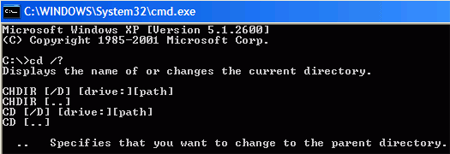
Note there is a space between the command and the switch. These help files will give you a quick blurb on the command's purpose, a guide to the proper syntax for using it, and a list of switches and other options that can be used with the command.
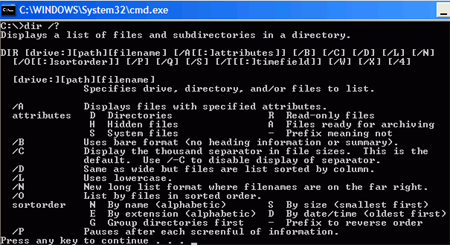
Switches are optional extra settings that can be used with command prompt commands to make them behave differently. For example, by default, the DIR command will list the contents of your current location in one continuous scrolling list. If you are in a directory that contains many files, like C:\windows\system32, this is not very useful. By adding the /p switch, you can make the list pause after every full screen of information is displayed, making the results easier to browse. In a similar fashion, 'DIR /w' will cause the folder contents to be listed in several columns, so you can fit more on a single screen. Switches come between the command itself and the target, like this;

type: dir /p windows\system32

More than one switch can be used with a command, like this;

type: dir /s /w /p windows\system32

Use the help (/?) switch for each command to find more useful switches and options!

< Previous Page © 2009 PCSTATS.com
Please respect the time and effort that went into creating each PCSTATS Beginners Guide, do not illegally copy. Thank you.
Next Page >

Toss Some Change into The Tip Jar
For less than the cost of a latté you can let the hardworking staff who write and maintain the GUIDES at PCSTATS know that we've helped you out of a jam, or dished out a bit of great tech advice. Toss in $3 bucks, or whatever spare change you like.

 Page 1:  Beginners Guides: WindowsXP Command Prompt
 Page 2:  Part 1: Entering and using the Windows XP command prompt
 Page 3:  Moving Between Folders
 Page 4:  — Switches and Command Help
 Page 5:  Creating and Deleting Folders and Files
 Page 6:  Command Redirectors
 Page 7:  More Handy CMD Commands
 Page 8:  All About IPConfig
 Page 9:  Tree and Netstat
 Page 10:  Tasklist and SystemInfo
SEARCH PCSTATS NEW - TRY IT OUT!
Use the power of Google to search all of PCSTATS and the PCSTATS Forums. Tell us what you think of this new feature - FEEDBACK?

   20.11.09 | 6:19P
Hardware Sections 
· Beginners Guides
· Cases and Access.
· CD-ROMs
· Chipsets
· Computers / SFF PCs
· Cooling - Heatsinks
· CPU / Processors
· Digital Cameras
· Hard Drives
· Home Theatre
· Memory
· MP3 Players
· Monitors
· Motherboards
· Mouse Pads
· Networking
· Notebooks
· PCs and SFF PCs
· Peripherals
· Powersupply
· Printers
· Servers
· Software / OS
· Videocards
- - -
· Editorials
Industry PR 
» GIGABYTE Unleashes First UD7 Motherboard

» Seagate Ships 2TB ATA 6GB/s Hard Drive

» Corsair Obsidian Series 800D high-performance chassis


google
 
PCstats Network Features Information About Us Rydium Network
FrostyTech
TransmetaZone
BeginnersPC
RamFinder
ShoppingList Assistance
PCstats.com Newsletter
Tech Glossary
Technology WebSite Listings
About Us
Employment / Internships
Privacy Policy
PermaLink News
Archived News
Submit News (Review RSS Feed)
Site Map
PCstats Wallpaper
Rydium Network
Advertising

How's Our Driving?
© Copyright 1999-2009 www.pcstats.com All rights reserved. Privacy policy and Terms of Use.