BACK TO PCSTATS + Motherboards
+ Videocards
+ Memory
+ Beginners Guides
News & Advanced Search  Feedback?
[X]   Directory of
Guides & Reviews
The PCstats Forums

Nov. ShoppingList
Beginners Guides
Weekly Newsletter
Archived Newsletters

  Press Releases
  Tech Glossary
  Folding Team
  3DMark Team
  Forum Team

Poll: Windows 7 Upgrade?
Are you planning on upgrading to Windows 7 on Oct. 28th?
Yes, Windows 7 Here I come!
No, Windows XP still works
No, Windows Vista still works
Total Votes:  3960

The Rydium Network
ASUS Vento 3600 Case Review
ASUS Vento 3600 Case Review - PCSTATS
Overall Rating:    81%
Abstract: The Vento case seemed to be begging us to leap onto it, fire up the engines and shoot off through the trees of Endor, dodging Imperial Scouts as we went...

 mfg'r link     category     date published     author    
  Asus   Cases   Apr.17.06   Mike D.  

Inside the Asus Vento 3600

The plastic cable organizer is the most immediately noticeable feature of the back of the case and provides a useful organizational feature.
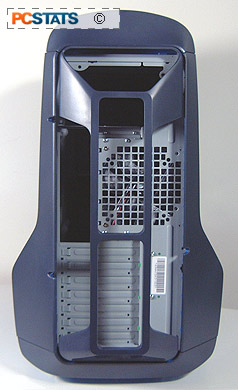
If you don't want it, it can be easily removed by pressing down on the top and pulling it off the case. The large vent holds a transparent 120mm fan which vents hot air out of the case. It has a low RPM rate and is practically silent. No power supply is included with the case as we have mentioned, but as the case fans are generally very quiet, we would recommend installing a low-noise powersupply into Asus' Vento 3600 for the full effect.
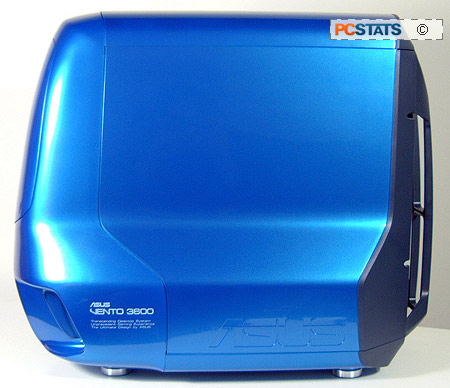
Got to love the amazing paint job on this case. The red one looks even sweeter.
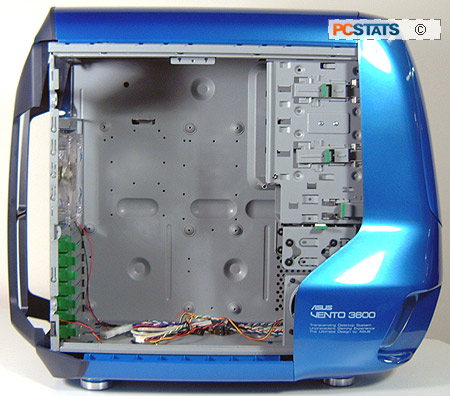
As you can see, the inside of the Asus Vento 3600 is spacious with plenty of room for large motherboards. The backplane is not removable, but the 3.5 inch drive rack is and the fixed drive bays support screwless installation (more about this below). Most of the metal edges are rounded off to reduce the chance of accidental injury.

The rear expansion ports are also screwless; the green locking caps secure the expansion cards and slot covers. Both case fans are practically silent, and neither lights up or does anything else fancy.

< Previous Page © 2009 PCSTATS.com Next Page >


 Page 1:  ASUS Vento 3600 Case Review
 Page 2:  Out of the box
 Page 3:  A closer look at the Vento 3600
 Page 4:  — Inside the Asus Vento 3600
 Page 5:  Installation and assembly
 Page 6:  Tooless Installation Features
 Page 7:  Opinions and Conclusions
SEARCH PCSTATS NEW - TRY IT OUT!
Use the power of Google to search all of PCSTATS and the PCSTATS Forums. Tell us what you think of this new feature - FEEDBACK?

   20.11.09 | 10:23P
Hardware Sections 
· Beginners Guides
· Cases and Access.
· CD-ROMs
· Chipsets
· Computers / SFF PCs
· Cooling - Heatsinks
· CPU / Processors
· Digital Cameras
· Hard Drives
· Home Theatre
· Memory
· MP3 Players
· Monitors
· Motherboards
· Mouse Pads
· Networking
· Notebooks
· PCs and SFF PCs
· Peripherals
· Powersupply
· Printers
· Servers
· Software / OS
· Videocards
- - -
· Editorials
Industry PR 
» GIGABYTE Unleashes First UD7 Motherboard

» Seagate Ships 2TB ATA 6GB/s Hard Drive

» Corsair Obsidian Series 800D high-performance chassis


google
 
PCstats Network Features Information About Us Rydium Network
FrostyTech
TransmetaZone
BeginnersPC
RamFinder
ShoppingList Assistance
PCstats.com Newsletter
Tech Glossary
Technology WebSite Listings
About Us
Employment / Internships
Privacy Policy
PermaLink News
Archived News
Submit News (Review RSS Feed)
Site Map
PCstats Wallpaper
Rydium Network
Advertising

How's Our Driving?
© Copyright 1999-2009 www.pcstats.com All rights reserved. Privacy policy and Terms of Use.