BACK TO PCSTATS + Motherboards
+ Videocards
+ Memory
+ Beginners Guides
News & Advanced Search  Feedback?
[X]   Directory of
Guides & Reviews
The PCstats Forums

Beginners Guides
Weekly Newsletter
Archived Newsletters

+70 MORE Beginner GUIDES....
Poll: 3D or Multi-Screen Gaming
Would you rather game in 3D or with surround screens?
Neither, a single 25" LCD is all I need for Gaming!
Multiple LCD screens for surround gaming is way better!
My money goes for 3D Gaming!
Total Votes:  542

 
 [NEW!] 
Samsung 9000-series LED HDTV Launch Event
Beginners Guides: Understanding and Creating Batch Files
Beginners Guides: Understanding and Creating Batch Files - PCSTATS
Marketplace: $/£/€ Price Search
Abstract: Batch files can save time by automating actions down to one simple click. A good understanding of what they are, how they work, and how to create your own, is crucial to today's IT force.
 Manufacturer:  Category:  Published:  Author: 
  PCSTATS   Beginners Guides   Apr.04.2005   Mike D.  

Creating a BATCH File

First open an explorer window to your c: drive, using Windows Explorer or 'my computer.' Arrange the window so you can see both your desktop and your c: drive contents.
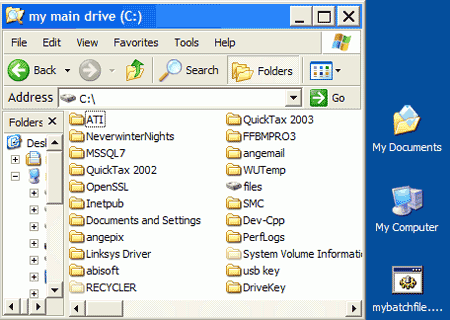
Open the notepad application by going to 'start\all programs\accessories\notepad' or 'start\run' and type 'notepad'.

In the blank notepad window, type:

md c:\testsource
md c:\testbackup

Now go to 'file' and 'save as'.
(in case you did not read our guide to the command prompt, the 'md' command instructs the system to create a directory using a name and location following the command.)

Save your first batch file on the desktop as 'myfirstbatch.bat'.

Close notepad and you'll see that 'myfirstbatch.bat' has appeared on the desktop. Double click the file to run it. Check your c: window. The 'testsource' and 'testbackup' directories have appeared. Your first simple batch file is a success! Delete the 'myfirstbatch.bat' file from your desktop.

< Previous Page © 2010 PCSTATS.com
Please respect the time and effort that went into creating each PCSTATS Beginners Guide, do not illegally copy. Thank you.
Next Page >

Toss Some Change into The Tip Jar
For less than the cost of a latté you can let the hardworking staff who write and maintain the GUIDES at PCSTATS know that we've helped you out of a jam, or dished out a bit of great tech advice. Toss in $3 bucks, or whatever spare change you like.
 Pg 1.  Beginners Guides: Understanding and Creating Batch Files
 Pg 2.  — Creating a BATCH File
 Pg 3.  Preparing for your second batch file
 Pg 4.  Anatomy of a batch file
 Pg 5.  Third trial batch file: getting fancy
 Pg 6.  Batch file error levels and the goto command
SEARCH PCSTATS NEW - TRY IT OUT!
Use the power of Google to search all of PCSTATS and the PCSTATS Forums. Tell us what you think of this new feature - FEEDBACK?

   31.07.10 | 12:19P
Hardware Sections 
· Beginners Guides
· Cases and Access.
· CD-ROMs
· Chipsets
· Computers / SFF PCs
· Cooling - Heatsinks
· CPU / Processors
· Digital Cameras
· Hard Drives
· Home Theatre
· Memory
· MP3 Players
· Monitors
· Motherboards
· Mouse Pads
· Networking
· Notebooks
· PCs and SFF PCs
· Peripherals
· Powersupply
· Printers
· Servers
· Software / OS
· Videocards
- - -
· Editorials
Industry PR 
» GIGABYTE Unleashes First UD7 Motherboard

» Seagate Ships 2TB ATA 6GB/s Hard Drive

» Corsair Obsidian Series 800D high-performance chassis


google
 
PCSTATS Network Features Information About Us Contact
FrostyTech
TransmetaZone
BeginnersPC
PCSTATS Newsletter
PCSTATS Forums
ShoppingList Assistance
Tech Glossary
Technology WebSite Listings
PermaLink News
Archived News
Submit News (Review RSS Feed)
Site Map
PCstats Wallpaper
About Us
Employment
Privacy Policy
Advertise on PCSTATS

How's Our Driving?
© Copyright 1999-2010 www.pcstats.com All rights reserved. Privacy policy and Terms of Use.