BACK TO PCSTATS + Motherboards
+ Videocards
+ Memory
+ Beginners Guides
News & Advanced Search  Feedback?
[X]   Directory of
Guides & Reviews
The PCstats Forums

Nov. ShoppingList
Beginners Guides
Weekly Newsletter
Archived Newsletters

  Press Releases
  Tech Glossary
  Folding Team
  3DMark Team
  Forum Team

+70 MORE Beginner GUIDES....
Poll: Windows 7 Upgrade?
Are you planning on upgrading to Windows 7 on Oct. 28th?
Yes, Windows 7 Here I come!
No, Windows XP still works
No, Windows Vista still works
Total Votes:  3960

 
The Rydium Network
DIY Guides: How To Install/Remove Intel Socket 775 CPU and Heatsink
DIY Guides: How To Install/Remove Intel Socket 775 CPU and Heatsink - PCSTATS
Abstract: With Intel's latest processor socket 775 formfactor, Intel has accomplished a couple of noteworthy things. The first was to substantially reduce the complexity and cost of manufacturing.

 mfg'r link     category     date published     author    
  Intel   Beginners Guides   Jan.08.09   Mike D.  

Locking the Processor in Position

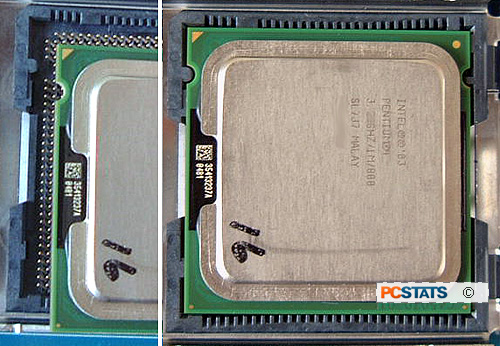
The Intel processor should sit flat in the LGA775 socket, with the little gold triangle pointing towards the cam lever arm. In the CPU is not flush in the socket, or the tabs are not aligned, remove and check the orientation once more.
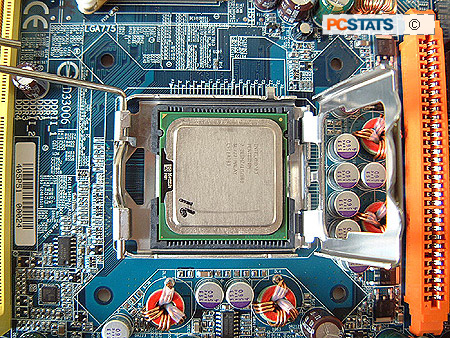
Now close the shim (load plate) and protective plastic cover. It will not close completely, as you can see below.
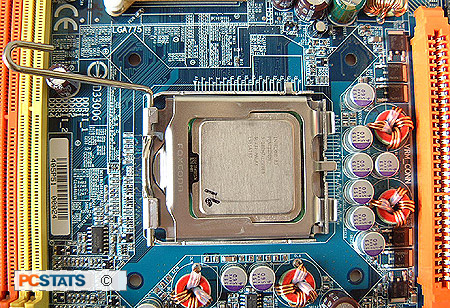
(Above: for clarity, shown with plastic cover removed)
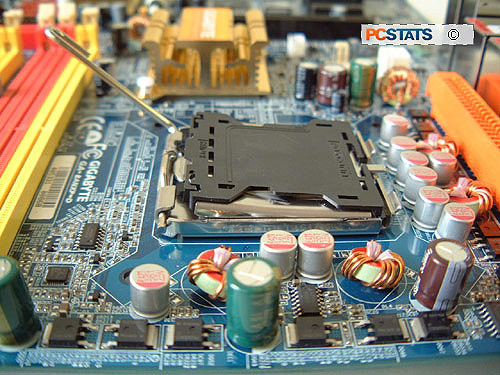
Press one finger down gently on the load plate where it is not completely closed, then rotate the cam lever arm down towards the closed position with your other hand.

< Previous Page © 2009 PCSTATS.com
Please respect the time and effort that went into creating each PCSTATS Beginners Guide, do not illegally copy. Thank you.
Next Page >

Toss Some Change into The Tip Jar
For less than the cost of a latté you can let the hardworking staff who write and maintain the GUIDES at PCSTATS know that we've helped you out of a jam, or dished out a bit of great tech advice. Toss in $3 bucks, or whatever spare change you like.

 Page 1:  DIY Guides: How To Install/Remove Intel Socket 775 CPU and Heatsink
 Page 2:  Installing an LGA 775 Processor Safely
 Page 3:  Inserting the socket 775 CPU the right way
 Page 4:  — Locking the Processor in Position
 Page 5:  Apply pressure to the LGA775 CPU
 Page 6:  Installing the CPU Heatsink Correctly
 Page 7:  Removing Socket 775 heatsinks and processors safely
SEARCH PCSTATS NEW - TRY IT OUT!
Use the power of Google to search all of PCSTATS and the PCSTATS Forums. Tell us what you think of this new feature - FEEDBACK?

   20.11.09 | 10:17P
Hardware Sections 
· Beginners Guides
· Cases and Access.
· CD-ROMs
· Chipsets
· Computers / SFF PCs
· Cooling - Heatsinks
· CPU / Processors
· Digital Cameras
· Hard Drives
· Home Theatre
· Memory
· MP3 Players
· Monitors
· Motherboards
· Mouse Pads
· Networking
· Notebooks
· PCs and SFF PCs
· Peripherals
· Powersupply
· Printers
· Servers
· Software / OS
· Videocards
- - -
· Editorials
Industry PR 
» GIGABYTE Unleashes First UD7 Motherboard

» Seagate Ships 2TB ATA 6GB/s Hard Drive

» Corsair Obsidian Series 800D high-performance chassis


google
 
PCstats Network Features Information About Us Rydium Network
FrostyTech
TransmetaZone
BeginnersPC
RamFinder
ShoppingList Assistance
PCstats.com Newsletter
Tech Glossary
Technology WebSite Listings
About Us
Employment / Internships
Privacy Policy
PermaLink News
Archived News
Submit News (Review RSS Feed)
Site Map
PCstats Wallpaper
Rydium Network
Advertising

How's Our Driving?
© Copyright 1999-2009 www.pcstats.com All rights reserved. Privacy policy and Terms of Use.