|
|
 |
- ECS PN2 SLI+ 680i Mobo
- Gigabyte 965P-DQ6
- Supertalent PC2-1000
- ABIT AW9D-Max Mobo
- MSI GeForce 8800GTX
- Corsair DOMINATOR DDR
- PCstats Weekly Tips

Newsletter Archives
|
nVidia nForce 680i SLI Motherboard Tested
Hello,
It
wasn't too long ago when nVidia just made videocards. The times have
certainly changed, now nVidia is known
equally as much for its motherboard chipsets as it is for
its Geforce graphics chips. In fact, nVidia has had such a strong
impact on the motherboard industry that VIA and SIS core
logics are rarely seen anymore. The new nForce
680i SLI has a lot going for it, but
Intel is still arguably the 800lb chipset gorilla. With AMDs acquisition
of ATI, we are starting to see ATI core logic taken seriously too. For
example, the new AMD/ATI 690G chipset is the first mainstream chipset to
integrate a full suite of analog and digital graphics ports along with a
High Definition HDMI video output. Set for release at CeBit 2007, the
upcoming nVidia Geforce 7050 (MCP68) chipset will be an even
match. It also introduces board level HDMI and HDCP, along with the old
favorites like Gigabit ethernet, SATA, and PCI Express. h'mm...
I smell a tidal wave of home theatre PC systems coming.At the top of
this issue is the nVidia nForce 680i SLI powered ECS PN2 SLI+
motherboard. This board supports Core 2 Quad processors, and comes
with a great assortment of gamer
friendly features. Next up is a good all around Intel P965
motherboard from Gigabyte, the GA-965P-DQ6. The most surprising thing on that
platform are the solid state
capacitors it uses.... if you've ever suffered from blown or leaking electrolytic
capacitors, this is a welcome change. A 2GB kit of Supertalent PC2-8000 DDR-2 memory
performs well on the PCSTATS test bench, but not before the ABIT AW9D-Max
motherboard kicks into high overclocking gear. Corsair busts out
with its ultra exclusive
DOMINATOR PC2-8888 DDR2 memory, each of
which requires special cooling. There are two Weekly Tech Tips at the
bottom of this newsletter today, enjoy! Don't forget to check out the full index of Beginners Guides for some quick ways to tune you PC into overdrive this March Break.
Thanks for
Reading,
Max Page
Editor-in-Chief - PCSTATS
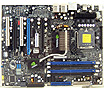
Let's be frank. The question isn't whether AMD or
Intel are leading the charge, it's
nVIDIA. For the last couple of years anyway, the graphics boys in
Santa Carla have shown the PC world how to make a good chipset and a
feature packed motherboard. The ECS PN2
SLI2+ is one the many "Designed by
nVIDIA" motherboards hitting the streets. It is based on the nVidia
nForce 680i SPP and nForce 680i MCP chipsets. Compared to the previous high end
nVIDIA nForce 590 Intel Edition chipset, the nForce 680i SLI really
only officially supports a higher FSB (up to 1333 MHz by default).
According to nVIDIA documentation, another improvement with the the nForce 680i
SLI is
that it will support overclocking better than the previous chipset.
Other than this one major change, the nForce 680i
SLI and nForce 590 SLI Intel Edition hold nearly identical feature
sets.Continue Here>>
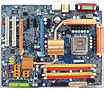
The Gigabyte
GA-965P-DQ6 motherboard has a healthy dose of enthusiast friendly
features like multiple eSATA ports, a unique motherboard heatsink to cool the
underside of the PCB, and even a totally silent chipset
cooling system. A full compliment of solid state capacitors work to ensure
this board will still be functioning years down the road, and not blown
and leaking electrolytic fluid. Built with the
workhorse Intel P965 Express and Intel ICH8R chipsets, the Gigabyte
GA-965P-DQ6 motherboard is compatible with all Socket 775
processors on the market right up to the Intel Core 2
Duo/Core 2 Quad. Expansion is possible via two PCI Express x16 slots for
graphics cards, while high bandwidth devices install into any of the three PCI
Express x1 slots.Continue Here>>
If you plan on building a computer system with the
idea of
overclocking it to the next level, it's really the memory you choose
that determines if you're going to be successful. SuperTalent's latest
memory, a pair of 1024MB T1000UX2G4
modules, has some pretty impressive specifications. The 2GB PC2-8000
memory kit is rated to run up to 1000 MHz with CAS Latency timings of
4-5-4-12. The kit is rated to run at DDR2-1000 or PC2-8000 speeds with
memory CAS
Latency timings of 4-5-4-12
, at a voltage of 2.2V. The SPD is set to JEDEC DDR2-800
standards, so don't forget to manually adjust the timings when tweaking
and overclocking.Continue Here>>
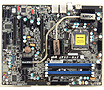
Universal ABIT is recapturing is former
glory. The ABIT AW9D-MAX
motherboard is based on Intel's top of the line 975X Express and ICH7R
chipsets, packs in quite a lot to get excited about. This high end desktop
chipset enables the AW9D-MAX to
accommodate 533/800/1066MHz FSB Intel socket
775 processors. The four memory slots can be filled with up to
8GB DDR2-800 RAM. Standard equipment on the motherboard includes dual PCI
Express based Gigabit network cards, ABIT's AudioMAX High
Definition 7.1 channel audio controller, eight 3GB/s SATAII channels,
Firewire IEEE 1394a and two additional two port Silicon Image SiI3132
Serial ATA II/RAID controllers. ABIT specific hardware includes microGuru,
a port 80
diagnostic card and the SilentOTES
thermal system
. Continue Here>>
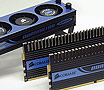
Corsair has up'd the ante with its new DOMINATOR
Twin2X2048-8888C4DF memory. Not only
does Corsair increase the stock voltage for this set of memory to
2.4V, it also utilizes a fancy external fan system to keep the modules from spontaneously
combustion. Corsair's new DHX heatsinks and the DOMINATOR
Airflow fan are the talk of the town. The 2GB Corsair DOMINATOR Twin2X2048-8888C4DF kit tries to offer enthusiast the best of all worlds;
these bad boys have relatively low 4-4-4-12 CAS latency, and a high
1111 MHz operating frequency. If you've got a Dell, well, just keep on
walking this memory is not for you.Continue Here>>
 |
|
PCstats Weekly Tech Tips: Folder Ownership & Network Access |
|
|
Tip #1 - Reassigning Folder Ownership:
Have you ever reinstalled WindowsXP only to have
it complain about ownership of a certain folder, giving
you an access denied error when trying to open a user's
directory? Ownership of folders is important so other users
cannot access your folder unless they have proper
administrative rights. This is done by default by the
operating system in an effort to keep individual user data
safe.
Luckily, reclaiming ownership of the
folder is an easy task. First thing to do is reboot the
computer and load the operating system in "Safe Mode". Do this
by pressing the F8 key as the computer boots and select "safe
mode" from the pre-boot menu screen (this Guide to Safe Mode explains it in greater
detail). In safe mode, login with a user account that has
administrative privileges and go to the location of the folder
in question. Right click on it and select
"Properties", click the "Security" tab and find the
"Advanced" button. Click on the "Owner" tab. Find your name or
account name then click the "Replace owner on subcontainers
and objects", click the "OK" button then "Yes". After that's
done reboot the computer and load WindowsXP normally. The user
in question will now have access to that folder once
again.
Tip #2 - Lazy Network Folder Access:
Here's a trick to allow network access to computers when
using blank passwords with Microsoft Windows Vista. Blank
passwords are only an option those on a small private
networks should consider. They are good for lazy
networking, and make it simple to share contents of a
computer without having to assign a login for each known user.
However, PCSTATS does not recommend this kind of password
regime as a rule. Anyway, on the Vista PC with the shared
folders, go to Start > Run and type "gpedit.msc" and press
the "Enter" key.
From there follow this path Computer Configuration -> Windows Settings -> Security Settings -> Local Policies -> Security Options.< P> In the right hand window double click on the "Accounts: Limit local account use of blank passwords to console login only" and disable it. After that's done, users will be able to log into the Windows Vista computer with a user account that has no password. Please note that doing this will leave the computer vulnerable should someone want to wreak havoc. Only enable this kind of lazy networking feature if you're sure of the others who use the PC. Or better yet, don't.
Let PCSTATS know what you think about this Tech Tip, and be sure to stop by PCSTATS Forums and post your comments or questions. |
|
Join the PCSTATS Forums Today @ forum.PCSTATS.com! |
|
|
PCstats Issue
No.238
Circulation: 152,075
|








 RSS Newsletter
