Every generation or two, motherboard manufacturers come
up with a new way of surprising consumers. Mainstream acceptance of
overclocking, enthusiast software utilities, an abundance of LED
lighting and complex cooling systems - you name it, its been
done. Good games are starting to make their way into motherboard software packages, a treat that used to be reserved for super-expensive videocards.
Asus has introduced a select group of
gamer friendly motherboards this past year that have generally raised the
bar quite high. The company has just put forth its BLITZ line, which
really goes over the top. The boards are laid out well for the kind of gear true gamers use (big fat videocards, lots of hard drives, gigantic CPU heatsinks), and come with such diverse things as an LCD peripheral display, Northbridge waterblock among others. The Asus BLITZ series is the new face of what a high end motherboard really represents.
Built on the venerable Intel P35 Express chipset, Asus
has two version of the BLITZ motherboard currently available. The only difference between the two, the BLITZ Formula and BLITZ Extreme, is the memory standard supported. The Asus BLITZ Formula runs on DDR2 memory and the BLITZ Extreme on DDR3. PCSTATS will be testing out the DDR2 version in this review, the DDR3 BLITZ Extreme can be found here.
The Asus BLITZ Formula motherboard is based around
Intel's P35 Express Northbridge and ICH9R Southbridge chipsets. It supports up
to 8GB of DDR2 800/1066 MHz memory. The motherboard also has two integrated
Gigabit network cards, two IEEE 1394a ports, 12 USB 2.0 slots, six Serial ATA II
slots (RAID 0,1,5,10,JBOD), one IDE channel and supports AMD CrossFire
technology too. Asus bundle a mountain of accessories, including a
SupremeFX 11 8-channel audio card and software like a full
version of 3DMark06 (good for the benchmark freaks out there) and the game
STALKER: Shadow of Chernobyl! For dual videocard CrossFire goodness, Asus has a special chip that splits the PCI Express bus evenly between the two physical PCI Express x16 slots, so each receives eight PCIe lanes.
The Asus BLITZ Formula works with 45nm Core 2 Duo and Core 2 Quad processors, and every other socket 775 CPU that runs on a 800/1066/1333MHz Front Side Bus. The Asus BLITZ Formula is a high end motherboard and as such comes with a high end
price of $309 CDN ($297 USD, £146 GBP). Make no mistake about
it, this Intel motherboard is only for those who want the absolute
best.
 |
|
Asus Blitz Formula Motherboard |
|
|
 |
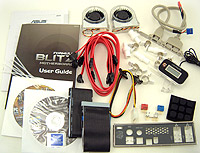
| Includes: |
| Driver
CD's, User Manual, Ultra/133 IDE Cable, Floppy Cable, 6x
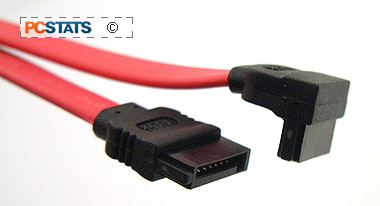
Serial ATA Cables, Molex to Serial
ATA Power Cables, audio card, 2x MOSFET fans, front
panel IO headers, rubber stands, LCD display, tubing connnectors, USB/Firewire
bracket, I/O Shield |
 | | |
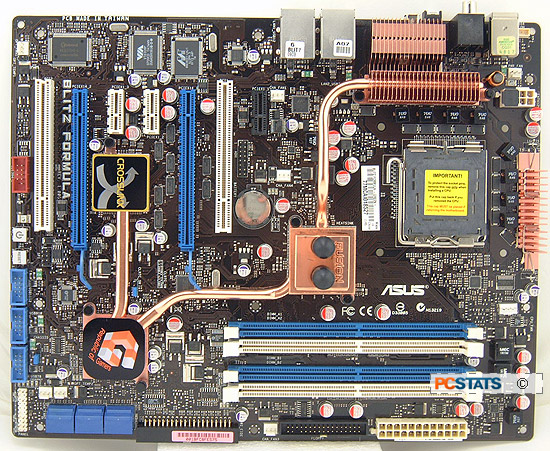
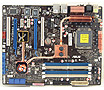
Isn't she a beauty? Yes the Asus BLITZ Formula motherboard is certainly a looker! While the Northbridge heatsink is watercooling compatible, it's not necessary to use watercooling with this motherboard. There's plenty of space between the expansion slots so you shouldn't have any problems installing any stand alone peripherals.
 The
layout of the motherboard is great, all six Serial ATA ports are placed together
at the bottom right hand corner of the motherboard. There you'll also find the Parallel IDE port, three USB headers, the second IEEE 1394a slot and the power/reset buttons.
The
layout of the motherboard is great, all six Serial ATA ports are placed together
at the bottom right hand corner of the motherboard. There you'll also find the Parallel IDE port, three USB headers, the second IEEE 1394a slot and the power/reset buttons.
Something enthusiast users may like, there are a total of six 3 pin fan headers on the Asus BLITZ Formula motherboard. About the only thing the BLITZ Formula is missing is a Port 80 diagnostics card.
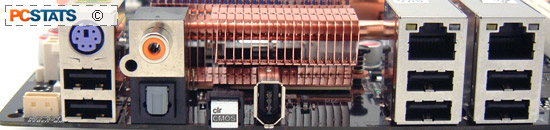
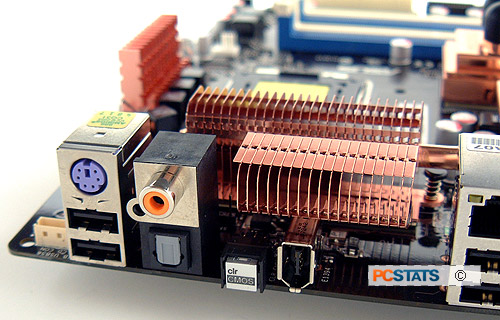
Asus did a great job with the rear I/O of the BLITZ Formula motherboard. There are six USB 2.0 slots, one IEEE 1394a and two eSATA ports, lots of connectivity which is great considering all the external peripherals available. Just a quick note though, the BLITZ Formula does not have a PS/2 port for the mouse so you'll need to get a USB mouse to use with the motherboard. Tweakers will absolutely love how Asus places a Clear CMOS button on the rear I/O, talk about making overclocking easy!
Asus place a waterblock on the Intel P35 Express Northbridge. It's not just for looks, with your own watercooling system you can hook up the motherboard using the supplied tubing connectors. If you're not already using a watercooling loop then you can get by with just air. If you are using watercooling though, connect up the Northbridge waterblock. Asus makes that easy with all the accessories that it includes. If you're going to be heavily overclocking the motherboard watercooling may help you reach those high speeds.
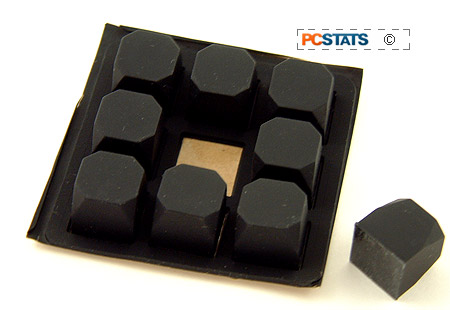
Asus bundles nine rubber pads with the motherboard and before you
ask, they're for propping up the motherboard. At 1cm in height, the pads are too
thick to use when installing a motherboard into case but for the enthusiast who
runs their computer without a case, it's exactly what the doctor ordered. Makes
setting the motherboard on top of the table or motherboard box much easier.
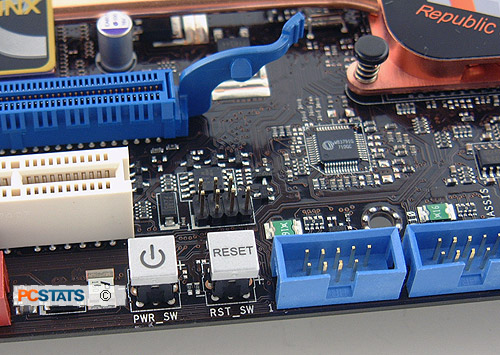
Again for the caseless users, Asus places Power/Rest buttons on the PCB. Both
buttons light up when the motherboard receives power so even in the dark you can
find things.
Solid Capacitors in place of the Electrolytic
variety 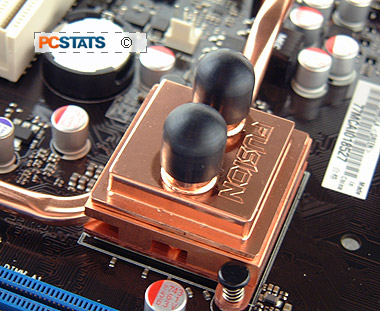
Asus have opted to use low ESR solid state polymer capacitors on the BLITZ
Formula motherboard. This kind of solid capacitor has a longer lifespan than the
electrolytic variety. As temperatures increase inside the computer case, the
lifespan of electrolytic capacitors begins to decline. Compared to standard
Electrolytic capacitors which use a fluid electrolyte, the 'all-solid' style
polymer capacitor last longer under the same conditions.
A few years back there was a huge problem with motherboards suffering from burst
and leaking electrolytic capacitors. This industry-wide event blossomed into
a full blown epidemic, and single handily dragged ABIT's name through the mud if
you recall. If you'd like to read up on the back story that led to the whole
problem of burst and leaking caps, have a look at this PCSTATS article. It's a rather fascinating story of industry
espionage gone awry.
The Asus BLITZ Formula uses conductive polymer aluminum
solid capacitors of the kind pictured right. The solid-state Low ESR
conductive polymer capacitors are housed in very distinguishable aluminum cans.
Next up, PCSTATS investigates the silent chipset and motherboard cooling
solutions on the ASUS' BLITZ Formula motherboard.






 RSS Newsletter
