When a
new Intel chipset launches the initial motherboards are often mainstream
offerings. It's then only a matter of time till a board that really stands
out from the crowd is released. Who can forget the ASUS' 945/espresso maker? Or
ECS's
legendary PF88 combo board that ran both Intel socket
775 and AMD K8 CPUs!?
Such
is the case with Intel's X48 Express based
ASUS P5E3 Premium/Wifi-AP.N motherboard. The name doesn't
exactly roll off the tongue, but this board has many features that certainly aren't found on
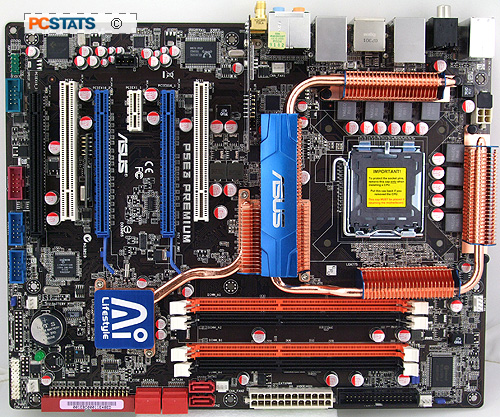
typical Intel X48 platforms. For starters, the ASUS P5E3 Premium has a class-N
wireless network card integrated into the motherboard's design that pulls
double duty as a Wireless access point, in addition to a pair of
wired gigabit LAN ports.
The
'Premium' part of the P5E3 Premium/Wifi-AP.N actually refers to a bunch of
different features that make up ASUS AI Lifestyle brand. This means ASUS' Express Gate, the system-on-a-chip that lets you boot up in 5 seconds and surf the web, check your email and watch Youtube clips without having to boot
into Windows, let alone access a hard drive, is there. It certainly sounds
neat, and PCSTATS will delve into its functionality later on in this review.
The P5E3 Premium naturally features the ASUS Energy Processing Unit
(EPU), which can shift between a four-phase and eight-phase power design in order
to save energy during light processor load. Gigabyte's DES power saving tool is better than
ASUS' EPU,
but let's not get distracted by token 'greening.'
While the special features set the ASUS P5E3 Premium motherboard
apart from the competition, it's still based on Intel's top socket 775
core logic. The P5E3 Premium uses DDR3 exclusively and has support
for Intel's Extreme Memory Profiles, so DDR-3 RAM at speeds of 800/1066/1333/1600/1800 and
2000MHz are supported. Up to a maximum of 8GB (4 slots
x 2GB DIMMs) can be installed. The P5E3 Premium
accomodates socket 775 Intel processors with a 800/1066/1333/1600 FSB and has some
interesting BIOS options that could very well translate into additional overclocking
headroom.
 |
|
ASUS P5E3 Premium/Wifi-AP.N
|
|
|
 |
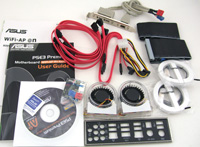
| Includes: |
| User's Manual, Wifi Manual,
(2) Wifi Antennas, (6) SATA cables,
I/O shield, IDE cable, floppy cable, USB/Firewire
bracket, (2) Auxiliary fans, molex to SATA power adapter,
Q-connectors, Driver CD. |
 | | |
The Intel ICH9R southbridge returns as the storage controller for the P5E3
Premium, and dished out the usual six SATA II connectors with RAID 0/1/5 and
10 support. These are supplemented by a JMicron controller that powers a pair of eSATA ports
on the motherboard's I/O panel, as well as an IDE connector for legacy optical
drives and hard drives.
Expansion
slots come in the form of three physical PCI express x16 slots. Two of these are designed
for multiple videocards, and can maintain x16/x16 lanes of PCI express 2.0 bandwidth
while in Crossfire mode. The third physical x16 slot only provides x4
lanes of PCI express 1.0 bandwidth, meaning it may bottleneck faster videocards. Rounding out
the expansion bays is a single PCI express x1 slot
and a pair of PCI slots for older peripherals. Firewire, 7.1 channel audio and a COM port
header come standard.
ASUS'
P5E3 Premium/Wifi-AP.N motherboard retails for $390 CDN ($320 USD, £220 GBP) , which puts it into the higher echelon of retails
boards. Will the P5E3's unique integrated wifi, bandwidth-rich Intel X48 chipset and speedy DDR3
memory support make it worth the big bucks ASUS is asking?
Premium Features Define this
Board
ASUS has given us everything enthusiasts ask
for in a motherboard and then multiplied that by pixie dust and a kitchen sink
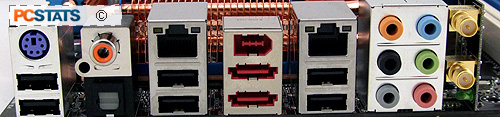
factor with the P5E3 Premium. Sure, other motherboards have dual gigabit
lan ports, but how many have dual eSATA? Or dual firewire? In addition to a
dual antenna wireless-N integrated network adapter?
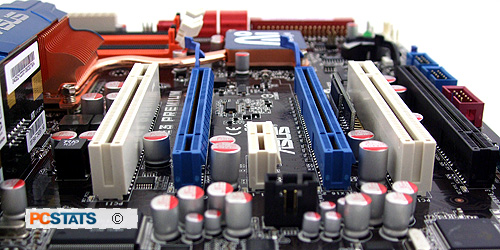
The expansion slots are well spaced so dual-slot
Radeon videocards in Crossfire won't be cramped. The PCI slot is off to the left of
the PCI Express x16 videocard slot so there will always be room for a separate PCI
sound card. The third (black) PCI express x16 slot only runs with four lanes of standard
PCI express bandwidth, while the matched blue PCI express slots get sixteen
lanes of PCI express bandwidth each.
The rest of ASUS' P5E3 Premium motherboard gets the deluxe
treatment too. The mid-board USB and Firewire connections are handled via
ASUS' Q-connectors.
Q-connectors are plastic blocks that act as a bridge between
the front panel cables from the computer case to the motherboard headers on the
PCB. ASUS has also thrown in half a dozen SATA cables as well to take advantage
of the Intel ICH9R southbridge controller and ASUS' supplementary Jmicron
connector. Cabling is kept nice and clean with a mixture of right-angle and
straight SATA cables included. The rest of the cables are kept on the edge of
the PCB, and are perpendicular to the expansion slots.
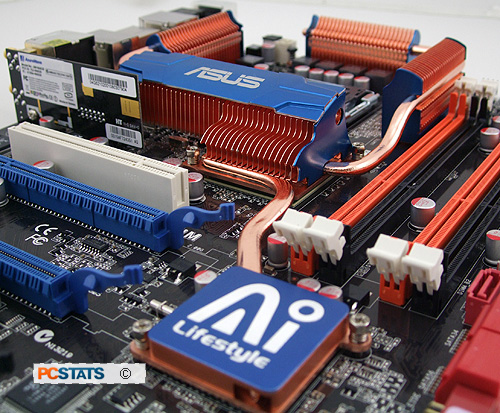
An extensive heat-pipe system is used to cool the chipsets and
MOSFETs. While these passive heat-pipes are designed to leave clearance for any socket
775 cooler, the P5E3's four-sided cooling design may pose a problem for owners of DDR3
memory which use mounted fans, or DIMMS of memory with particularly large heatsinks.
There's simply not a lot of clearance between the RAM and the side of the
heatpipe grills.
Like all passive heatpipes, this system is only effective
when used in conjunction with an active fan for cooling, which in most cases
will be a standard CPU heatsink-fan combo that pushes air over the heatpipes and
grills, circulating cold air and allowing the heat to dissipate. This means that
owners of water-cooled systems will need additional cooling for their chipset,
and not surprisingly ASUS has accommodated them.
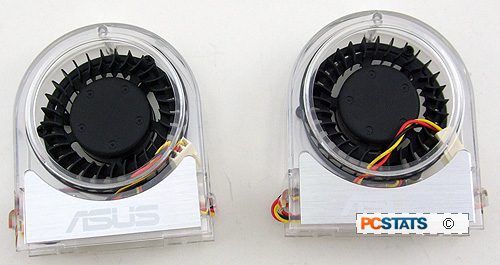
These miniature
fans can be attached to one of the P5E3 Premium's five plugs for
three-pin fans. In addition, each fan can be manually adjusted in the BIOS
for speed and noise tweaking. Note that these fans shouldn't be used in a case
that's already ventilated by a regular air cooler.
|
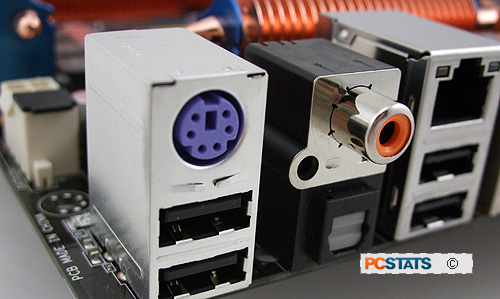
S/PDIF coaxial and optical ports
mounted on the I/O shield are an easy way to output from the ASUS P5E3
Premium to a receiver or HDTV. |
The I/O shield (which has a padded EMI gasket to prevent
sliced fingers) houses the S/PDIF connectors, six USB ports (two more on an
included bracket) and 8.1CH stereo and PS/2 keyboard output. Curiously, the
board only has a PS/2 jack for the keyboard, where the mouse would be are two
USB2.0 jacks.






 RSS Newsletter
